
What to know before you start
Nobody can guarantee you the first spot
Google says it plainly in its own guide: no one can guarantee a first place in Google. It also warns separately about anyone who claims a "special relationship" with Google or offers "priority submission". Rankings are decided by Google's systems, not by an agency's promise or a payment. The only way up is to do the things Google looks at better than your competitors and to keep doing them over time.
To doTurn down offers that promise "guaranteed first place" · Management
These offers usually come in three forms: "we guarantee the first spot", "we have a special relationship with Google" and "you'll be on page one in a month". Google lists all three as warning signs in its own guide. Behind them there is often a click bot, bought links, or a trick such as ranking first for your own brand name. You already rank first for your own name, so selling that as a result misleads you.
When you look at an offer, ask the questions Google suggests:
- Can you show me examples of your previous work and their results?
- Do you follow Google Search Essentials?
- What results do you expect, in what timeframe, and how do you measure success?
- Will you explain every change you make to my site and why?
Google also tells you to be wary of firms that won't explain what they do, give vague answers or contact you out of the blue by email.
SEO is more than text and keywords
Many SEO services edit page titles, add a few words to pages and build on the pages your site has already earned. That brings some visibility, but it is half the job. The other half is in the site's code: does the page reach Google as ready HTML without waiting for JavaScript, is the price in the page source, does the same page open at several addresses, is the site fast? On WordPress and on custom software alike, this takes development skills.
On top of that come marketing and sales: people have to know the brand they find on Google and be able to buy what they came for. An agency or a team that can't do one of these parts stays half done, however well it does the others.
To doAsk who will look after the technical side of your site · Management
If an offer only mentions "content" and "keywords", nobody is covering the technical side. Before you sign, ask:
- Who will check how our site looks to Google (URL inspection in Search Console)?
- Who will touch the server and the theme if speed becomes a problem?
- Who will set up the redirects if the site moves or the addresses change?
If nobody at the agency does this work, make the agency work together with your own developer or with the company that built your site. Otherwise each side assumes the problem belongs to the other and nobody fixes it.
To doDon't mistake the ad campaign your SEO agency runs for SEO · Marketing
Many agencies start with SEO and after a while move on to running Google Ads campaigns. Ads stop the day the payment stops. SEO grows as it builds up. They are different jobs and should be measured separately. Google also says that advertising neither raises nor lowers your organic ranking.
The ad's text, its visuals and who it is shown to should be prepared by a marketing team or a marketing agency. If the agency only spends the budget, the brand gains nothing however long the ads run, because there is no message for people to remember.
Results come in months and years, not days
Google's own starter guide says a change can take anywhere from a few hours to several months to show in search results, and that you should wait a few weeks to judge its effect. That is the time for a single change. Getting ahead of your competitors usually takes one, two, sometimes three years of work: content builds up, other sites start linking to you, your brand becomes known, and Google's click data collects over months. That is why any offer of a shortcut deserves suspicion. The branch "Why does this take time?" below explains why new sites move more slowly.
What we knowGoogle updates all the time, and rankings move during updates
Google releases several large core updates a year and makes smaller changes it does not announce. During these periods your position can go up and down for a few days. That movement alone is not a sign of a problem. What matters is where you stand once the update has finished.
To doFollow Google's updates and your own rankings regularly · Marketing
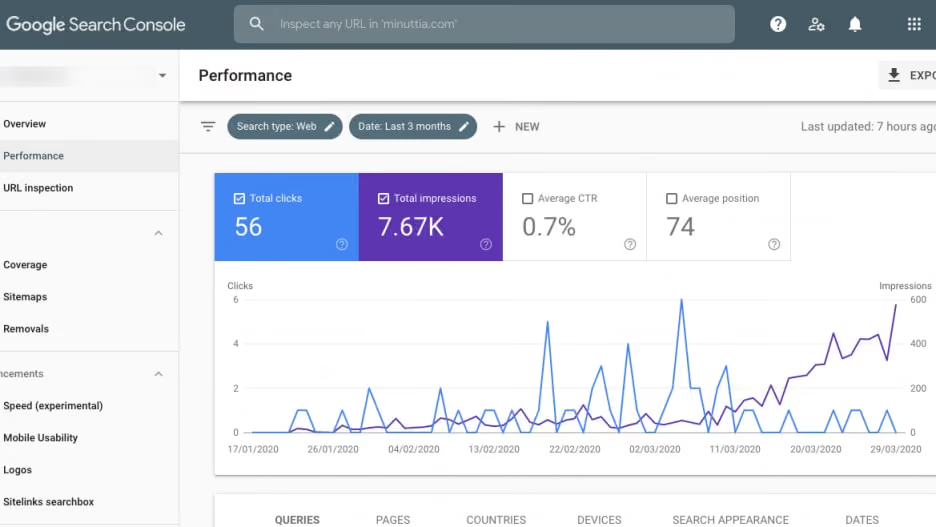
Google announces large updates with their start and end dates on the Google Search Status Dashboard (status.search.google.com). Track your own rankings in Search Console:
- Open Search Console and go to Performance in the left menu.
- Set the date range to the last 3 months and use the Compare tab to set it against the previous period.
- On the Queries tab, see which searches went up and which went down.
Don't rush changes to the site while an update is still rolling out. Compare at least a week after it has finished, because results don't settle before that.
This is the work of several teams, not one person
Reaching the top of Google doesn't happen through one setting. If software, content, marketing, sales and management don't work toward the same goal, one piece is always missing. The site may rank first, but the customer is lost because sales replies late. Or the content is excellent, but nobody clicks on it in the results because nobody knows the brand. That is why every task on the map says which team does it.
What we knowSoftware opens the door, content creates value, marketing spreads the word, sales turns it into customers, management protects the time and budget
- Software opens the door: it makes sure the site is open to Google, fast and built correctly. If that door is shut, the work of every other team never reaches Google.
- Content creates value: it prepares the article that answers the customer's question, the product information, the photos and the videos. That value is what Google puts in front.
- Marketing spreads the word: through social media, email newsletters, ads and trade fairs it makes people learn your name. People who know your name search for you on Google and click on you in the results.
- Sales turns demand into customers: it follows up on quotes, gets back to customers on time and looks after the most important ones (key account management). Only then does a visitor from Google become revenue.
- Management protects the time and budget: it knows the work takes months, doesn't cut the budget early and makes sure every task has an owner.
- Staff and HR carry the brand: a workplace its people describe well is also known through its job ads and through their own circles.
What we knowBeing found on Google does not bring sales on its own
Even if Google puts you first, a customer only buys if they trust what they see. If the product photos are poor, if price or shipping is unclear, if nobody answers a request for a quote, the visitor moves on to the next result.
The same chain has other links. If you want to sell abroad, the site has to be in that country's language. A regular email newsletter to your customers and bringing back old customers keep your brand in mind. These look like they sit outside SEO, but the clicks, the time on site and the searches for your name that Google looks at feed on exactly these things.
To doGive every task on this map an owner in your company · Management
Every task on the map carries a team name: Software, Content, Marketing, Management or People. To apply this to your own company:
- Click a branch. The panel on the right opens with the list "What to do on this branch".
- Write each item, with the name of the person who will do it, into a spreadsheet or your task tracker.
- List the items nobody takes on separately. These are either jobs to outsource or jobs you consciously put off.
- Go through the list together once a month. When you tick the boxes in the panel, your browser remembers which tasks are done.
Work without an owner doesn't get done. Items everyone agrees on in a meeting but nobody takes on wait for months.
Can Google see your site?
Your site must not be closed to Google
To show a page, Google needs three things: Google's crawler (Googlebot) must be able to reach the page, the page must load without errors, and there must be content on it to read. Google can't see a page behind a firewall, bot protection or a login, and it can't index what it can't see.
To doCheck that your firewall or Cloudflare doesn't block Google's crawler · Software
The three most common ways site owners leave Google at the door without knowing it are a country block, bot protection that is too strict and a badly written security rule. The country block is the sneakiest. If you open the site only to your own country and block the rest of the world, you block Google too, because Google's crawler mostly comes from addresses in the USA.
To check:
- Paste the address of one of your pages into the search box at the top of Search Console (URL inspection).
- Click "Test live URL". If the test can fetch the page, Google's door is open.
- If the result shows an error such as "access forbidden (403)" or "page fetch failed", Google is being stopped at the door.
- In Search Console, open Settings > Crawl stats. If 403 or 429 responses make up a large share in the "By response" table, something is blocking Google.
- If you use Cloudflare, look at the list of events in the Security section (Security Events). If requests named Googlebot are being blocked or challenged, loosen that rule.
Cloudflare's default bot settings leave out verified bots, and Googlebot is one of them. The problem usually comes from a country rule added later or a hand-written security rule. You can check whether a visitor in your server logs that looks like Googlebot is really Google against the list of addresses Google publishes.

To doLook at a page through Google's eyes with URL inspection in Search Console · Software
URL inspection shows everything Google knows about a page on one screen: whether it is in the index, when Google last visited it, which address it treats as the main one and how it saw the page.
First, set up Search Console:
- Go to search.google.com/search-console with your Google account and add your site.
- Prove that the site is yours. The most robust way is to add the TXT record Google gives you to your domain's DNS settings. On WordPress, Google's Site Kit plugin does this for you.
Then, to look at a page:
- Paste the full address of the page into the search box at the top of Search Console and press Enter.
- "URL is on Google" means the page can appear in search. "URL is not on Google" means it can't, and you see the reason by opening the "Page indexing" section.
- Use "Test live URL" to see how Google sees the page right now, then "View tested page" to open the HTML Google received and a screenshot. If the price, the text or the product is missing from the screenshot, Google doesn't see them either.
- Once you have fixed the page, use "Request indexing" to ask Google to look at it again. This is not a guarantee, it puts the page in a queue, and there is a daily limit. If many pages changed, keep your sitemap up to date instead of requesting them one by one.
Getting into Google's index takes time, and not every page gets in
Google doesn't add every page it sees to its index, and a page that isn't indexed never shows up in search. The same goes for being cited in AI Overviews: the page must be indexed, must be eligible to show with a snippet, and must not be excluded through the AI setting in Search Console.
What we knowGoogle doesn't index every page, and publishing a page with some text isn't the end of the job
Before Google adds a page to its index, it looks at it: does the page give the reader something, is it a copy of another page, is the rest of the site trustworthy? That is why opening lots of pages with a few sentences each doesn't work. Pages that don't make it show up in Search Console under lines such as "Crawled - currently not indexed" or "Discovered - currently not indexed".
What we knowExample: on a spare parts site the same product is sold by dozens of suppliers and the page text is almost the same
When you type a bearing or spare part code into Google, dozens of sites selling the same product come up and most use the same technical text from the manufacturer. Google treats these pages as copies of each other.
What we knowGoogle picks one of several near-identical pages and doesn't show the others
Google treats near-identical pages as a group, picks one as the main page and shows that one in search. This alone is not a penalty. Google only chooses which one to show. But the page it doesn't pick won't appear for that search.
QuestionWhy should Google pick our page?
Because your page has something the others don't. The moment you add your own information to the manufacturer's text, the page is no longer a copy and becomes a candidate Google can pick.
To doAdd information to the page that isn't anywhere else · Content
The list of what you can add is in the branch "Information you can't find elsewhere stands out" below. In short: your own photos, which machine the product is used in, a dimensions table, equivalent parts, stock and delivery information, and answers to the questions customers ask.
To doRead the Pages report in Search Console regularly · Software
This report shows how many of your pages are in Google's index, how many aren't, and why.
- In Search Console, go to Indexing > Pages in the left menu.
- The chart at the top shows the number of indexed and not indexed pages. If the number of indexed pages suddenly drops, something has broken.
- In the "Why pages aren't indexed" table below, each row is a reason: noindex, redirect, not found (404), duplicate, crawled but not indexed and so on.
- Click a row to see the affected pages one by one. If a page that should be indexed is in this table, fix the reason, then tell Google with "Validate fix".
For most sites, once a month is enough. After moving the site or a large change, look once a week for a few weeks.
Google reads the phone version of your site
Google reads and ranks pages from their phone version. Text that is cut down on the phone or never loads there doesn't exist for Google. Expandable sections are fine. Removing text from the page is the problem.
To doKeep the same text and headings on the phone page as on the computer · Software
Google reads and ranks the page as it appears on a phone. Some themes hide product descriptions, tables or reviews on phones to save space, or don't load them at all. In that case the information doesn't exist for Google.
To check, open the page on a phone and compare it side by side with the computer version. The headings, the text and the images should be the same. URL inspection in Search Console also tests the page with a phone browser, and its screenshot shows the phone version.
To doDon't put important content behind a click or a scroll · Software
Google's crawler doesn't press buttons on a page and doesn't scroll down like a person. Text fetched from the server when someone presses "Read more", or reviews that load only on scroll, may be invisible to Google.
Sending the text with the page and only hiding it visually is fine. Expandable sections, tabs and accordions are normal for Google. The problem is text that never reaches the page. Search for that text in the HTML on the "View tested page" screen in URL inspection. If it isn't there, Google doesn't see it.
The site must open over a secure connection
Google prefers the secure connection (https) that opens with a padlock in the address bar and counts it as part of page experience. Browsers show a "Not secure" warning on sites without https, and visitors who see it may give up on a form. A valid certificate and a one-step redirect from http to https are enough. A free Let's Encrypt certificate takes one click in most hosting panels.
To doRedirect every http address to https permanently · Software
If a visitor or Google arrives at the old http address, they should reach the https address in one step. The redirect should be permanent (301) so that Google replaces the old address with the new one.
To check, type
http://yoursite.cominto your browser. It should open as https. Most hosting panels (cPanel, Plesk, Hestia) have a "redirect to HTTPS" option for this. If you use Cloudflare, the "Always Use HTTPS" option in the SSL/TLS settings does the same job.To doUse only https addresses inside the site and in the sitemap · Software
If the links in the menu, in articles and in the sitemap still start with http, every click goes through a redirect first and Google bounces between two addresses. On WordPress, make sure both addresses under Settings > General start with https. You can fix the http links inside old posts in bulk with a search-and-replace plugin such as Better Search Replace. Back up the database before you do.
Price and product information must be visible as soon as the page opens
Google can read content that JavaScript loads later, but it does so in a second step, in a queue. If the main content comes with the page's first HTML, Google reads it without waiting. Most AI crawlers, like ChatGPT's, don't run JavaScript, so this is the only way they see the content.
To doBuild pages on the server or ahead of time · Software
A page can be built in two ways. In one, the server sends the page as ready HTML and the browser shows it straight away. In the other, the browser gets an empty shell and JavaScript fills in the content afterwards. For Google and for AI crawlers, the first is always safer.
- WordPress and WooCommerce pages are already built on the server. Problems usually come from plugins that load the product list or the price later with JavaScript.
- On sites built with React, Vue or Angular, server-side rendering (SSR) or static generation should be on. Next.js and Nuxt support both.
To check, open the page source (Ctrl+U) and search for a sentence from the page. If it isn't in the source, the content arrives later.

To doKeep price and stock visible in the page source · Software
Price, stock status and shipping are the details Google shows in product results. They should be in the page source and in the product structured data (Product). If there is an empty box where the price should be in the source, or the price only appears after choosing an option, Google sees a wrong or missing price.
To check, open the source of a product page with Ctrl+U and search for the price. Then give the page's address to Google's Rich Results Test (search.google.com/test/rich-results) and see whether the product information is read.
Products must be reachable through their categories
Google gets to know an online shop through the links from the menu to categories and from categories to products. This path explains how the site is built and shows which pages matter. A product no page links to is hard to find even if it is in the sitemap.
To doGo from the menu to the category and from the category to the product with real links · Software
Google moves through an online shop the way people do: from the home page to the menu, from the menu to a category, from the category to a product. Every step has to be a real link so Google can follow it. Category pages should list all products page by page (1, 2, 3) and every page should have its own address. A product no page links to is hard to find even if it is in the sitemap, and Google gives it little weight.
To doLink to your key products from the home page or from articles · Content
The more pages, and the more important pages, link to a page from inside your site, the more important Google considers it. The home page is usually the strongest page on a site. Link to your best-selling or most profitable products from the home page, from related blog posts and from guides. Use the product's name in the link text, not "click here".
To doShow the "Home › Category › Product" path at the top of the page · Software
This path (a breadcrumb) shows visitors where they are and tells Google how your site is built. Google may also show this path next to the address in search results. WooCommerce and most themes include it, and Yoast and Rank Math can add it too. It's good to mark the path up with BreadcrumbList structured data. You can check it in the Rich Results Test.
Google must be able to reach every page on the site through a link
Google finds new pages in two ways: through links inside the site and through the sitemap. Links are the main way. A page no other page links to (an orphan page) either doesn't exist for Google or doesn't matter. Every page should get at least one real link from inside the site.

To doUse real links in menus and lists · Software
Google only follows real links in the form
<a href="/address">. A menu item that opens with JavaScript on click, a button without anhrefor a link that only points to#is not a path for Google.To check, right-click an item in the menu. If "Open link in new tab" appears and the right page opens in the new tab, it's a real link. If it doesn't, ask your developer to turn that item into a real link.
To doKeep pages with their own addresses behind "Load more" and infinite scroll · Software
If products load as you scroll or when you press "Load more", Google sees the first products and may miss the rest, because Google's crawler doesn't press buttons. The fix is to also offer the same list on pages with their own addresses, like
?page=2and?page=3, and to link to those pages normally. Visitors keep scrolling, and Google walks through the pages one by one.
The same page must not open at several addresses
If the same content opens at several addresses, Google decides for itself which one to show, and the clicks and links you receive are split between the addresses. This isn't just technical untidiness, it divides the page's strength. On very large sites it also wastes the time Google spends on the site.
What we knowThis is about copies inside your own site
For example, if the same product page opens at both
/product/bearing-6204and/category/bearings/bearing-6204, that is a copy inside your own site. Text that matches other sites is a separate subject, covered in the branch "Information you can't find elsewhere stands out".To doGive every page a canonical tag that states its main address · Software
Canonical is a tag in the page's
<head>that tells Google "this page's main address is this one":<link rel="canonical" href="https://yoursite.com/product/bearing-6204/">. Even if the page also opens at another address, Google gathers clicks and links on the main one.The methods Google lists, from strongest to weakest:
- Permanent redirect (301): sends the copy to the main address. The strongest signal.
- Canonical tag: used when the page has to open at both addresses. A strong signal.
- Sitemap: the addresses in it are candidates for the main address. A weak signal.
To check, give the page's address to URL inspection. If the "User-declared canonical" and the "Google-selected canonical" differ, Google doesn't agree with your choice. Review the internal links and redirects that point to the copies. On WordPress, Yoast and Rank Math add the canonical tag to every page automatically.
To doAlways link to the main address inside the site · Software
Canonical is a signal, and Google sometimes picks another address. One of the things that influences its choice most is your own links. Links in the menu, category lists and articles should always point to the main address and always be written the same way: either with
wwwor without it, either with a trailing/or without it. The sitemap should contain only main addresses too.What we knowExample: if the site opens both at the root and under /tr, every page is seen twice
This is common on multilingual sites: the Turkish site opens unchanged at both
yoursite.comandyoursite.com/tr. Google sees both addresses and can't tell which one is the main one.To doPick one address and redirect the other to it permanently (301) · Software
Decide which address stays and redirect the other to it permanently (301). Set the redirect up on the server: with the Redirection plugin on WordPress, with Redirect Rules on Cloudflare, or in the server configuration on nginx and Apache. To check, open the old address in your browser. The new address should appear in the address bar.
To doConnect the language versions to each other (hreflang) · Software
If the site has Turkish and English versions, every page should point to its counterpart in the other language. This is done with the hreflang tag:
<link rel="alternate" hreflang="en" href="https://yoursite.com/en/...">. Google then shows the Turkish page to people searching in Turkish and the English page to people searching in English, and doesn't treat the two as copies.Multilingual plugins such as WPML and Polylang add this tag automatically. Both pages must point to each other. Google ignores hreflang given from one side only.

To doDon't send visitors to another language automatically based on location or browser language · Software
Sending visitors to another language automatically based on their IP address or browser language causes problems for Google. Because Google's crawler mostly comes from addresses in the USA, it keeps being sent to the English page and may never see the Turkish pages. Show a language switcher at the top of the page instead. You can add a banner saying "This page is also available in Turkish", but leave the choice to the visitor.
What we knowExample: filters and sorting create a new address with every choice
If a category has color, size, brand and price filters, every choice creates a new address, for example
?color=black&size=42&sort=price. These combinations add up to thousands of addresses, and most are identical or empty. Google wastes time walking through them.To doStop filter addresses from being crawled with robots.txt, return 404 for empty filters · Software
Google's advice: if filter addresses don't need to appear in search, stop them from being crawled with robots.txt, for example with a rule like
Disallow: /*?*color=. A filter combination that returns no products should answer "not found" (404), not show an empty list. If you want certain filters to appear in search (for example "black leather shoes"), give them their own category pages with clean addresses.
Moved or deleted pages must go to the right place
A permanent redirect tells Google "this page now lives here", a temporary one says "it will be back soon". Google treats a page that looks like an error page but answers normally (200) as a "soft 404". The most expensive mistake in a site move is moving without matching every old address to its new counterpart, because rankings built over months are wiped out overnight.

To doRedirect a moved page permanently (301) to its new address · Software
When a page's address changes, the old address should go to the new one through a permanent (301) redirect. Google then carries the old address's ranking and links over to the new one. A temporary redirect (302) tells Google "the page will be back soon", and the old address may stay in the index. To see the type of redirect, check the old address with a tool such as httpstatus.io. It should say 301.
To doReturn 404 for deleted pages, don't send all old addresses to the home page · Software
A deleted page with no similar replacement should answer "not found" (404) or "gone" (410). Redirecting all old addresses to the home page looks easy, but Google treats these as "soft 404s" and the visitor lands on the home page without finding what they wanted. If a product or page replaces it, redirect there. If not, return 404 and show a search box and the main categories on your 404 page.
To doKeep redirects in place for at least a year · Software
Google's site move guide recommends keeping redirects for at least a year. Links from other sites to your old addresses and people's bookmarks live on for years, so if you can, never remove them.
When you move a site:
- Make a list of all old addresses. The sitemap, the Performance report in Search Console and your analytics give you this list.
- Match each old address to its new counterpart in a spreadsheet.
- After the move, test every row of the spreadsheet. Each old address should reach the new one in one step.
The sitemap must be current and correct
The sitemap gives Google a list of your pages and helps new pages get found faster. On a small, well-linked site it isn't required. On an online shop with hundreds of products, or a site that adds new pages often, it helps a lot.
To doPut only live pages you want in search into the sitemap · Software
The sitemap is the list you give Google that says "these pages matter, look at them". If it contains redirected, deleted, noindex or duplicate addresses, the list can't be trusted. On WordPress, Yoast, Rank Math or WordPress's own sitemap (
/wp-sitemap.xml) build this list automatically. In the plugin settings, take content types you don't want in search, such as tag and attachment pages, out of the sitemap.To doChange the last modified date only when the content really changes · Software
Each address in a sitemap can carry a last modified date (
lastmod). Google only uses this date on sites where it finds it consistent and accurate. If every page's date is refreshed every day, Google stops trusting it. The date should change when the page's main content changes, not because the year in the footer changed.To doList the sitemap in robots.txt and submit it in Search Console · Software
- Add the line
Sitemap: https://yoursite.com/sitemap.xmlat the end of your robots.txt file. - In Search Console, go to Indexing > Sitemaps, enter the sitemap's address and click Submit.
- A few days later, check on the same page that the status is "Success" and that the number of discovered pages is close to the number of pages on your site.
- Add the line
The site must load fast and without errors
Google decides how often and how much to visit a site based on how much the site can handle. If the server slows down or starts returning errors, Google visits less, and new pages and changes are noticed later. On a site that loads fast and reliably, these visits increase.

To doCheck server response time and errors in Crawl stats in Search Console · Software
- In Search Console, go to Settings > Crawl stats > Open report.
- Look at the average response time chart. If it keeps rising or goes above a second, the server is slowing down.
- If the Host status section shows server connectivity, DNS or robots.txt problems, Google is struggling to reach your site.
- If the share of 5xx (server error) and 429 (too many requests) responses grows in the By response table, Google starts visiting your site less.
To doKeep page caching on, and find and fix what's slow · Software
Caching means keeping a ready copy of the page and sending it immediately, instead of building it from scratch on every visit. On WordPress this is done by a caching plugin such as LiteSpeed Cache, WP Rocket or W3 Total Cache, or by the server's own cache.
Pages that are still slow with caching on usually come down to a heavy plugin, a slow database query or a weak server. On WordPress, the Query Monitor plugin shows which plugin and which query slow a page down.
Empty pages must not be shown to Google
Empty pages give the reader nothing, and most of them never get into Google's index. The page of a product that is temporarily sold out should stay, though. In that case Google recommends updating the stock information instead of removing the page.
To doHide empty categories and brand pages with few products until they fill up (noindex) · Software
Category and brand pages with no products, or only one or two, give the reader nothing. For Google they are empty pages and can count against you in assessments that look at the site as a whole. Give these pages noindex until you add products, or merge them with similar pages. In WooCommerce you can set noindex one by one on the category edit screen with Yoast or Rank Math.
To doDon't delete a product that is temporarily out of stock, only update the stock information · Software
The page of a product that is temporarily sold out should stay, to keep its ranking and the links it has earned. The page should say "Out of stock", and the stock status in the structured data should be
OutOfStock. Show the visitor similar products and a "Notify me when available" option. If the product will never come back, redirect the page to the product that replaces it or to its category.
Read what Google tells you regularly
Search Console is the only place where Google talks to you directly about your site. Penalties, security problems and pages left out of the index show up there first. Since 2026, visibility in AI results is reported there too.
To doCheck four reports in Search Console once a month · Software
Look at these four reports in Search Console every month:
- Performance: how many times you appeared for which searches, how many clicks you got and your average position. Compare with the previous month.
- Pages (under Indexing): the number of indexed and not indexed pages and the reasons.
- Manual actions: whether a person at Google has taken action against your site. It should say there are no issues.
- Security issues: whether your site has been hacked. It should also say there are no issues.
Search Console also emails the site owner when it finds a serious problem. Make sure those emails go to an address someone actually reads. Under Settings > Users and permissions you can see who has access to the site.
To doFollow the report on your visibility in AI results · Marketing
Search Console now also reports how often you appear in AI results. Compare these numbers with the normal results. For searches where your site appears but gets no clicks, the reader's question is most likely being answered inside the summary. For those searches, check whether your page offers something the summary can't give: your own measurements, your prices, your examples.
Does your page answer the searcher's question?
First know which searches you want to appear for
Google understands which searches a page should appear for from its content. If you don't think ahead about the words the reader will search with, the page ends up written in a language nobody searches. The best place to start is the searches Google already sees you close to, and your customers' own questions.
To doFind the searches where you appear between positions 8 and 30 in Search Console · Marketing
For these searches Google already finds you relevant but doesn't put you at the top of page one. This is where a small improvement brings the fastest result.
- In Search Console, go to Performance > Search results and set the date range to the last 3 months.
- Turn on "Average position" in the boxes at the top.
- Use the filter icon above the Queries table to keep only rows with a position greater than 8 and less than 30.
- Starting with the most impressions, write these searches into a list, and check on the Pages tab which of your pages appears for each.
Strengthening these pages usually works faster than writing new ones: add the missing answer, match the title to the search, link to them from related pages.
To doWrite down the questions customers ask you · Marketing
The questions people ask on the phone, on WhatsApp, by email and in the shop are the same questions they type into Google. Ask your sales and support teams to note the five most common questions every week. When a question comes up for the third time, answer it on the site: a paragraph on the product page, a guide or a note. These questions are your customers' real language, which makes them more valuable than a list from a keyword tool.
To doRead what currently ranks in the top 10 for that search · Content
Type the search you are aiming for into Google yourself, and open and read the top 10 results. Searching in a private window reduces the effect of your personal history. Look at:
- Are the results product pages, categories, guides or map results? That shows what kind of page Google wants for this search.
- Which questions do the pages answer, and which do they skip? The question they skip is your opening.
- Is there an AI summary, a shopping box or a video at the top? If so, the normal results are pushed down the screen.
The aim is not to copy them, but to find the information they don't have.
The page must give the searcher what they actually want
Information for someone who wants information, a product for someone who wants to buy, an address for someone looking for a place. A page that doesn't match the intention behind the search won't stand out for that search, however well it is written.
What we knowThe same words can be searched with different intentions
What could someone who types "bearing" be looking for? It could be a student who wants to know what a bearing is, or a maintenance technician who wants to buy a specific code. Google knows which kind of page gets clicked and read for this search and ranks the results accordingly. It shows an information page to someone who wants information, a product or category page to someone who wants to buy, and a map result to someone looking for a place nearby.
To doMake every page answer one intention · Content
Don't try to make one page a sales page, a guide and a news page at once. Let the product page give the buyer the price, stock, delivery and technical details. For someone searching "which bearing should I choose?", write a separate guide and link from it to the related products. The quickest way to see which intention to answer is to look at what kind of pages Google shows for that search right now.
The answer must come in the first paragraph
If readers find what they want on the first screen, they stay. If not, they go back to Google and click another result. Google says there is no ideal page length and that length alone doesn't affect ranking. The aim isn't to write long, it's to give the answer first and the detail after.
To doGive the short answer to the question in the first paragraph of every page · Content
Readers arrive with a question and look for the answer in the first few seconds. Give a clear answer in the first paragraph, "yes", "no", "this much" or "it depends on this", and follow with the details and the reasons. Don't open the page with a company introduction or general filler.
To check, open the page on a phone. If you can't see the answer on the first screen, neither can the reader. Google's AI summaries also often quote this clear part of a page.
Don't try to rank for the same search with several pages
Two weak pages that answer the same question don't add up to one strong page. Cover a subject in one place, in its best form. Since a search usually shows at most two results from the same site, multiplying similar pages doesn't win you extra places anyway.
What we knowGoogle doesn't penalize this, but your pages split each other's strength
John Mueller of Google says several pages ranking for the same search isn't a problem in itself. The problem lies elsewhere: when you write two very similar pages, the links, clicks and internal links you receive are split in two, and Google decides again and again which one to show. That's why your position swings between the two pages. In SEO this is called "keyword cannibalization".
To doFind where several of your pages appear for the same search in Search Console · Marketing
- In Search Console, go to Performance > Search results.
- Click one of your important searches. The report filters to that search only.
- Switch to the Pages tab. If you see several pages here and more than one gets meaningful impressions, they compete for the same search.
- Extend the date range and look at the chart. If position and clicks swing between the two pages, it's clear.
The fix is usually to merge the two pages into one stronger page and redirect the old one permanently (301) to the new one. If the pages really answer different questions, separate their titles and first paragraphs so they state that difference clearly, and link from one to the other.
Information you can't find elsewhere stands out
Google puts the page that first brings out a piece of information ahead of the pages that quote it. For a product where a hundred sellers use the same supplier text, what sets you apart is the information you add.
To doDon't take copied content, create our own · Content
Copied content comes in two kinds: text taken from other sites and text the manufacturer gives to everyone. Neither adds anything the reader can't find elsewhere. Creating your own content doesn't mean writing from scratch, it means putting the knowledge you already have onto the page.
QuestionHow do we create our own content?
What these items have in common is that they are all information you have and others don't. You don't need to do all of them for every product. Start with the best sellers and the products people ask about most.
What we knowGoogle's measure: information, research, analysis and first-hand experience other pages don't have
When Google assesses content, it asks: does this page repeat what other pages already say, or does it add new information, its own research or first-hand experience? Content that mainly summarizes what others wrote without adding much is on Google's list of warning signs.
To doTake our own photos: the product in hand, with its size, in use · Content
The manufacturer's catalogue photo is the same on every site that sells the product. A photo you take yourself exists only on your site and shows the product's real size, color and packaging. A good phone, daylight and a plain background are enough for most products. A few shots of the product in a hand, next to a ruler, fitted or in use also answer the customer's question "how big is it?"
To doShoot our own video: ours even if it isn't perfect · Content
A 30-second video showing how a product is fitted, how it works or what comes in the box sets your page apart from similar ones. You don't need a studio. A vertical phone video with clean sound is enough. If you also upload the video to YouTube and put it on the product page, you open a separate door on YouTube and on Google.
To doWrite up our own test: we used it, measured it and wrote down the result · Content
The best answer to "does this cable really charge fast?" is a measurement: charge the same phone with two cables and write down the times. Your own test is information nobody can copy. Explain how you measured too, so the reader can trust the result.
To doAdd information nobody else has: which product fits which device, which part replaces which · Content
Compatibility and equivalent parts are what customers ask about most and find least on websites. Give, in a table, which phone models a case fits, or which codes a bearing can be swapped with. That table both increases sales and helps Google set your page apart as "information not found elsewhere".
To doAnswer the questions customers ask and the reasons for returns on the product page · Content
The reasons products are returned show what's missing from the product page: "smaller than I expected", "didn't fit my phone", "different color". Collect these reasons and add a sentence to the page for each. Returns go down, and the page becomes more useful.
To doWrite a buying guide: which product suits whom, and whom it doesn't · Content
Questions like "which power bank should I buy?" are asked before buying. A guide that compares products and says "this one for this use, that one for that use" takes the reader to the right product. A guide that can say "this product isn't for you" earns the reader's trust.
What we knowHaving AI rewrite the supplier's text doesn't make it original, and doing it in bulk is spam
AI rewrites the same text in different words but adds no new information. The page still says the same as a hundred other sellers' pages. Doing this in bulk for hundreds of products falls under what Google calls scaled content abuse. Use AI to organize your knowledge, not to produce it.

Who wrote it and how it was made must be clear
Google says trust is what it looks at most in content, and it asks three questions: who wrote it, how was it made, and why was it written? The answers should be visible on the page. If readers can tell who the author is, they trust the article, and Google tries to measure that trust.
To doAdd the author's name and a page about the author to every article · Content
Readers should be able to see who wrote an article. Put the author's name at the start or end of the article, and link it to a page that says who the author is and what experience they have.
Give Google the same information through structured data:
- In the Article structured data, put only the author's name in
author.name, without job titles or company names. - Put the address of the page about the author in
author.url. - If there are several authors, list each one separately. A person's type is Person, an organization's is Organization.
On WordPress, Yoast and Rank Math take this from the author profile, so filling in the biography and social accounts under Users > Profile is enough. Don't use a made-up author name or an AI-generated author photo. Google explicitly calls this deception and a sign of low quality.
- In the Article structured data, put only the author's name in
To doIf AI helped, say so where the reader would wonder · Content
Google writes that it is helpful to tell readers how content was produced. Where a reader would ask "how was this made?", for example in a comparison table or in summaries of many products, explain in a short note what the AI was used for. You don't need a warning on every paragraph. The point is not to hide it and to be honest with the reader.
Write for people first, not for Google
Google's list of warning signs includes producing lots of content on every subject, heavy automation, summarizing others without adding anything, writing about something just because it's trending, hitting a word count, presenting an answer to a question that has none, and changing dates to look fresh. If readers leave your page and have to search again somewhere else, the content was written for Google.
To doDon't wander into subjects you don't know just for traffic · Content
Writing about every subject, spreading across many topics in the hope that some of it works, is on Google's list of warning signs. A spare parts seller's article about cryptocurrency doesn't build trust and blurs what the site is about. When choosing a subject, ask "would our customer want to hear this from us?"
To doDon't write to a word count · Content
Google has no preferred word count. An article stretched to reach 1,500 words tires the reader and buries the answer. If the answer takes three paragraphs, the article is three paragraphs. A long article is only valuable when the subject really needs a long explanation.
To doDon't make content look new without changing it · Content
Refreshing the date at the top of an article every month, or adding and removing a few sentences just to look "current", is on Google's list of warning signs. Only update the date when the content really changes: when new information is added, when a price or a rule changes, when a mistake is fixed.
AI is fine to use, as long as it adds something for the reader
Google doesn't ban the use of AI, it sets the standard. If the page adds something for the reader, it doesn't matter who wrote it. If it doesn't, the result is the same whether a person or an AI wrote it.
What we knowGoogle treats pages produced in bulk without oversight as spam
Producing a separate page for every variation of a search, or filling hundreds of pages with AI and publishing them without anyone reading them, is what Google's spam policy calls scaled content abuse. It counts the same whether a person or a program does it. What decides is whether the page adds anything for the reader.
What we knowAI images can carry a trace
If an image file carries provenance information (C2PA), Google can show that the image was made or edited with AI. Putting an AI image where a product page should show the real product also affects the reader's trust and the return rate.
To doHave a person check the titles, descriptions and product details AI writes · Content
AI writes fast, but it also writes confidently where it isn't sure. A single mistake in dimensions, compatibility, price or warranty turns into a return and a bad review. Before publishing, have a person check:
- Are the numbers and technical details correct?
- Does the text promise something the product can't do?
- Does the text resemble another product's text?
- Is the question the reader will ask answered?
Images must be in a form Google can understand
Google understands what an image shows from its alt text, its file name and the text around it. It doesn't index images placed as CSS backgrounds. Google Images and Google Lens are separate doors for traffic, especially for product and venue photos.

To doWrite a short description (alt text) for every image saying what it shows · Content
Alt text is a short description written for someone who can't see the image: a visitor using a screen reader, and Google. Google says alt text is the most important piece of information about an image.
- Good: "Black leather phone case on an iPhone 15, side view"
- Bad: "case phone case cheap case best case"
On WordPress, open the image in the Media Library and fill in the "Alternative Text" field. WooCommerce product images use the same field.
To doGive files meaningful names and place images next to the related text · Content
Rename the image before you upload it:
black-leather-iphone-15-case.jpginstead ofIMG_4521.jpg. Google recommends short but descriptive file names. Place the image right next to the text it illustrates, because Google also understands an image from the text around it.To doServe images as AVIF or WebP and sized to the screen · Software
Converting PNG or JPEG images to AVIF or WebP often cuts the file size in half or more, with no visible loss of quality. Sending a small image to a phone and a large one to a large screen (
srcset) also avoids needless downloads. The page gets faster, and the visitor's data allowance isn't wasted.On WordPress, a plugin such as Imagify, ShortPixel or EWWW does this automatically, and WordPress itself creates the different sizes. Don't add images as CSS backgrounds: Google doesn't index images set through CSS.
What we knowLocation data in a photo (EXIF) doesn't affect ranking
A photo taken with a phone carries the place and time it was taken and camera details (EXIF). John Mueller of Google said in 2021, and Martin Splitt in 2024, that this information is not used for ranking. Adding location to photos is therefore not an SEO technique. Most sites strip this information when compressing anyway, which is good for privacy: customer photos can reveal where someone lives.
To doAdd creator and copyright information (IPTC) to your own photos · Content
Unlike EXIF, IPTC information says who took the photo, how it should be credited and who holds the copyright. Google Images can read and show it. If you also add a license page, a "Licensable" badge can appear next to the image.
To add it:
- In Lightroom, open the IPTC section of the Metadata panel. In Photoshop, open File > File Info.
- Fill in Creator, Credit Line and Copyright Notice.
- When exporting, choose not to strip metadata. Check that the compression plugin on your site doesn't remove it either.
Google doesn't guarantee this information will always be shown. Its real benefit is that your ownership shows when your photos are used on other sites.
What we knowYour products can also appear in Google Lens and Google Images
A customer can take a photo of a product they like and search for it with Google Lens. Google can show products from shops that send their product data to Merchant Center in Google Images and in Lens results for free. The conditions are that the product is approved in Merchant Center and its image is sharp. Your own original product photos stand out here too, because among a hundred sellers using the same catalogue photo, yours is the only one.

A video needs its own page
For Google to show a video in results, the video has to be the main content of a page. A video that loads on click or sits in a corner of a page is usually not seen.
To doPublish every important video on a page where it is the main content · Content
To show a video as a video in search results, Google wants the video to be the main content of its page. If you put a video at the bottom of a page or in a sidebar, Google doesn't treat it as the page's subject. Open a separate page for important videos, put the video at the top and write below it what the video covers.
To doGive the video a fixed thumbnail and descriptive data (VideoObject) · Software
Video structured data (VideoObject) holds the video's name, description, thumbnail, duration and upload date. If you embedded a YouTube video, Yoast's Video SEO plugin or Rank Math can add this automatically. If you serve the video from your own server, your developer adds it by hand. You can see that it's there in the Rich Results Test.
Tell Google separately what the page is (structured data)
Structured data tells Google what a page is in a language machines understand: this is a product, this is its price, it's in stock, it has this many reviews. That makes it eligible for rich results in search such as stars, price and stock. Not every markup brings a result, and Google retires result types from time to time.
To doMark up price, stock and brand on product pages (Product) · Software
Product structured data tells Google the product's name, price, currency, stock status, brand and barcode (GTIN) in a language machines read. It can let your product appear in search results with its price and stock.
- WooCommerce adds this by itself, and Yoast WooCommerce SEO or Rank Math add brand and barcode fields.
- On custom software, your developer adds it to the page as JSON-LD.
To check, give a product page's address to the Rich Results Test. If there are no errors under Product snippets or Merchant listings, the information is read correctly. The product reports under Enhancements in Search Console show errors across all products at once.
To doGive review stars only from real customer reviews · Software
The stars (rating) in search results should come from real customer reviews on your product page. The marked-up reviews and rating must match the reviews readers can see on the page. Marking up made-up reviews or reviews copied from another site breaks Google's rules.
There's one more rule to know: Google doesn't show stars for reviews a business collects about itself on its own site (for LocalBusiness or Organization). Stars for product reviews on product pages can be shown. In WooCommerce, enabling reviews and the verified owner label is enough.
To doIntroduce the company with its logo, official name and social accounts (Organization) · Software
Organization structured data on the home page tells Google your company's official name, logo, address, phone number and social accounts (
sameAs). Google can use it to recognize your brand and show your logo in search results. In Yoast it's under Settings > Site representation, in Rank Math under Titles & Meta > Local SEO.What we knowThe FAQ result was removed in 2026
Since May 7, 2026 Google no longer shows the question-and-answer result that opened under a search result, and it removed the documentation for it. So adding an FAQ section and FAQPage markup to a page just for that result no longer earns anything.
That doesn't mean you should delete the FAQ section on your page. If it answers questions your customers really ask, it helps readers and can stay. What should go are bloated FAQ sections full of questions nobody asks, written only to repeat keywords.
What we knowStructured data doesn't raise rankings on its own, and the marked-up information must be visible on the page
Structured data tells Google what a page is and makes it eligible for rich results, but it doesn't raise your position on its own. Marking up information readers can't see on the page, such as a discount that doesn't exist or hidden reviews, breaks the rules and can lead to a manual action.
Dates must be real and consistent
Google wants a visible date on the page and the published and modified dates in structured data. Readers also judge how current information is from its date. Refreshing the date without changing the content is on Google's list of warning signs.
To doThe date on the page, in the structured data and in the sitemap must say the same thing · Software
Google can read an article's date from three places: the date shown on the page, the published (
datePublished) and modified (dateModified) dates in the structured data, and the last modified date in the sitemap. They should agree.- Show the publication date at the start of the article, and a "Last updated" date if it was updated.
- Write the dates in structured data with a time zone, for example
2026-10-31T09:00:00+03:00. Without one, Google assumes its own time zone. - Change the modified date only when the content really changes.
On WordPress the theme needs to show the article's "Last updated" date. If it doesn't, a plugin can add it. Yoast and Rank Math take the dates in structured data from the post's own dates.
Write about what you know
The leaked Google documents contain fields that measure how focused a site is on its subject. Google's own warning points the same way: moving into an area where you have no expertise just for traffic is a bad sign. A site that goes deep on one subject comes to be seen as a reliable source on it.
To doWrite down the site's main subject and subtopics once, and plan content around them · Content
On a sheet of paper, write your site's main subject and the subtopics your customers ask about. For a phone accessories shop, for example: cases, chargers and cables, power banks, screen protectors. Every new article or page should fit into one of these subjects and link to the other pages on it. A subject that fits none of them is the wrong subject for you, however much it is searched.
For some searches, fresh content comes first
For searches about news, prices, new models and new rules, Google looks at freshness. Not for every search: for questions that need lasting information, an old but correct page can come first. That's why keeping old articles up to date is worth it.
To doPut pages whose prices, models or rules change on a calendar and update them regularly · Content
Price lists, "best products" articles, regulations and campaign pages age over time. List these pages and give each a review date: prices once a month, guides every six months and so on. If the information has changed at review, update the page and refresh its date. If not, leave the date alone.
Product reviews must come from someone who actually used the product
Google's reviews system rewards evidence-based reviews from people who actually used the product: their own photos, their own measurements, pros and cons. Reviews compiled from marketing text fall behind.
To doPut proof that you used the product into the review · Content
Google's reviews system looks for evidence such as your own photo or video of the product, your own measurements, a comparison with similar products, and its pros and cons. A review should include:
- How long and how you used the product
- Something you measured: time, weight, temperature, charging speed
- Who the product doesn't suit
- How it differs from a similar product
Rewriting the manufacturer's promotional text is not a review.
Do other sites talk about you?
Links from other sites still matter
Google still uses links to understand what pages are about and how much they are worth. Another site linking to you is saying "this page is worth a look". But what counts is not the number of links, it's that they come from pages people really read and that relate to your subject.
What we knowWhere a link comes from matters more than how many there are
One link from a relevant page people actually read is worth more than links from a hundred pages nobody visits. A link to a bearing seller from a machine manufacturer's site means far more than one from an unrelated network of blogs. The documents leaked from Google in 2024 also suggest that links from pages nobody clicks on are largely ignored.
To doSee who links to you with the Links report in Search Console · Marketing
- In Search Console, go to Links at the bottom of the left menu.
- The Top linked pages table shows which of your pages other sites link to most. If the pages you want to sell aren't here, they need to earn links.
- The Top linking sites table lists the domains that link to you. If you see many sites you don't know and that have nothing to do with your subject, take note.
- The Top linking text table shows the words other sites use when they mention you.
- The Internal links table shows the pages on your own site that get the most links. Your important pages should be near the top.
This report is a sample. It doesn't show every link and doesn't say whether a link is nofollow. Still, it's the only free source, straight from Google, on who links to you.
Buying links doesn't work, and it does harm
Buying and selling links for ranking, excessive link exchanges and keyword-rich links planted on other sites are on Google's spam list. Google either ignores these links or takes manual action against your site. Either way the money is wasted.
What we knowWhat Google counts as link spam
The examples in Google's spam policy:
- Buying or selling links for ranking purposes
- Excessive link exchanges ("link to me and I'll link to you") and partner pages made only for cross-linking
- Links with keyword-rich anchor text in articles, guest posts and press releases published on other sites
- Creating links with automated programs or services
- Links hidden inside widgets distributed across other sites
- Links from low-quality directory and bookmark sites
Offers that sell a "1,000 backlink package" fall under almost all of these.
To doDon't buy links and don't swap links · Marketing
Buying links ends one of two ways. Either Google already ignores those links and the money is wasted, or it spots the link network and takes manual action against your site. Getting out of a manual action, by having links removed one by one and requesting a review, can take months. If an agency sells you "quality backlinks", ask in writing which sites the links will come from and how. If the answer is vague, turn the offer down.
To doMark ad and affiliate links (rel="sponsored") · Software
Every link you give or receive in return for money, a product or a service should be marked with
rel="sponsored":<a href="https://..." rel="sponsored">. If you sent a blogger a free product to review, the link they give your site is of this kind too. The attribute doesn't forbid the link, it only tells Google not to count it for ranking. Most WordPress SEO plugins offer it as a checkbox when you add a link.To doMark links in comments and forums (rel="ugc") and clean up spam · Software
Links in visitor comments and forum posts should be marked with
rel="ugc". WordPress adds this to links in comments by itself. The real work is cleaning out spam comments: turn on a plugin such as Akismet, hold first comments for approval and check pending comments once a week.To doTouch the disavow tool only when you need to · Software
Google's disavow tool lets you tell Google not to count some of the links pointing to your site. Google recommends using it only when two conditions are both true: your site has a large number of spammy or artificial links, and those links have caused a manual action or are likely to. Google writes that most sites don't need the tool and that using it wrongly can harm your rankings. There's no need to disavow links one by one because you suspect a competitor is sending spam your way. Google already ignores most of them.
Links are earned naturally
Google doesn't explain how to earn links, it explains what not to do. The way known from experience is to produce something genuinely worth mentioning and to appear on the sites of the businesses, associations and press you already know.
QuestionWhere do natural links come from?
Links only come by themselves when there is something worth linking to. These are the ways that work most often.
To doGet listed on the sites of the manufacturers, dealers and suppliers you work with · Marketing
Many manufacturers have a "Where to buy", "Authorized dealers" or "Partners" page. These are trustworthy links directly related to your subject.
- Check whether the brands you sell have such a page.
- If they do and you're not on it, send your sales contact or the brand's contact address a short email: your company name, the products you sell, your site address.
- Also ask to be listed on the "references" pages of your suppliers and customers.
To doAppear with trade associations and in the local press · Marketing
If the chambers, unions and associations you belong to list their members online, make sure your details and your site address are correct there. For the local press you need real news: a new investment, new jobs, an award, data that's useful to the region. "Our company is at your service" is not news. When you have something newsworthy, send local papers a short press note with a photo.
To doPublish your own data that others will cite · Content
People link to data when they cite a source. Turn what you know into something quotable: a year of price changes, the questions customers ask most, the result of a survey in your sector, your own measurements. Publish it on a single page, dated and with the method explained. Journalists, students and other sites will link to it on their own.
To doBuild tools and maps people share on their own · Marketing
A calculator (shipping cost, unit conversion, a bearing code finder), a selection tool or a map is a page readers come back to and send to others. Over time such pages get shared in forums, on social media and on other sites. This map is an example.
To doFind articles that mention you without a link and ask for one · Marketing
Some sites mention you but don't link to you. To find them:
- Search Google for your brand name in quotes, excluding your own site:
"your brand" -site:yoursite.com - Add your brand name to Google Alerts (google.com/alerts). You'll get an email when your name appears on a new page.
- Write a short, polite thank-you email to sites that mention you positively but don't link, and ask them to add a link so their readers can find you.
- Search Google for your brand name in quotes, excluding your own site:
A link's text must describe the page it leads to
Google uses the text on a link to understand what the page it leads to is about. Short, clear link text that names the subject guides both readers and Google.
To doUse link text that says what the page is about, instead of "click here" · Content
The text on a link (the anchor text) tells readers and Google where the click goes.
- Good: "dimensions table for the 6204 bearing"
- Bad: "click here", "more", "link"
Keep link text short and natural. Writing every link with the same keyword doesn't look natural. If you write guest posts for other sites, stuffing the link there with keywords is on Google's spam list.
To doLink to every important page from inside the site · Content
When you add a new article or product, link to it from older pages on the same subject. If you add a new power bank, for example, link to it from the "Which power bank should I buy?" guide. Link to related products and categories inside your articles too. Internal links tell Google which pages matter and carry the reader to the next step.
Tell people about your site
Google's own essentials include this: tell the relevant communities about your site. Excessive, intrusive promotion works the other way, and both the community and Google see it as spam.
To doTake part in communities, forums and events in your sector · Marketing
Be where your customers ask questions: sector forums, LinkedIn groups, Facebook groups, trade fairs, events by professional bodies. Answer questions there instead of advertising. Write the full answer in the thread and link to the page where you explain it in more detail if needed. Accounts that keep dropping their own links count as spam and get removed from communities. The person who gives useful answers becomes known over time, and people search for their name.
To doBe a guest in the press, on podcasts and in trade publications · Marketing
Giving expert comment to a trade magazine, appearing on a podcast or speaking at a fair brings your name to people who have never heard it. Most of these publications link to their guest's site, and even when they don't, listeners search for your name on Google.
Do the people who find you stay on your site?
Google looks at how people react to the results
Google's own internal presentation names three pillars of ranking: what the page says about itself, what other sites say about it, and what users do with it. Google still writes on its own page that it uses aggregated and anonymized interaction data to judge whether results are relevant to searches. So Google isn't the only one deciding whether a page is good. The people who visit it vote too.
Clicks change rankings
In the US court case, Google's head of search described a system that re-ranks results by looking at clicks (NavBoost). According to the reports, it looks at about 13 months of click data. So the effect of a click you win today lasts for months, and so does the effect of one you lose. That's one reason new sites move slowly: there's no click data built up yet.
The real measure is the search ending on your page
The leaked documents contain separate fields for good clicks, bad clicks and the last long click of a search. If someone clicks your result, finds what they wanted and doesn't go back to Google, that's a good sign. If they go straight back and click another result, it's a bad one. The real goal is for the search to end on your page.
To doMeasure which pages people stay on and which they leave right away · Marketing
Without measuring whether visitors stay on the site, you can't know which pages send Google a good signal. Setting up an analytics tool and checking it once a month is enough for that.
QuestionHow is it measured?
Read three measures together: how many people see you on Google and click, how long those who click stay on the site, and how many go straight back.
To doCheck in Search Console which position you hold for which search and how many people click · Marketing
The Performance report in Search Console shows how many times you appeared for each search (impressions), how many people clicked (clicks), your click-through rate (CTR) and your average position.
- Go to Performance > Search results and turn on all four boxes.
- Sort the Queries table by impressions.
- Find searches with many impressions but a low click-through rate. Google shows you there, but people choose another result. Look at the title and description of these pages first.
- Compare the click-through rate with other searches where you hold a similar position. If you're clicked less at the same position, the problem isn't your ranking, it's how your result looks.
To doTrack time on site with your own analytics tool · Software
Search Console shows you the click on Google, but not what the visitor does on your site. For that you need an analytics tool.
- In Google Analytics 4, average engagement time in Reports > Engagement > Pages and screens shows how long people stay on each page.
- Tools that don't need cookie consent, such as Umami or Plausible, give the same information more simply. If you host them on your own server, the data stays with you too.
Look for pages that get many visitors from Google but where visitors leave within a few seconds. These pages either don't answer the searcher's question or bury the answer too far down.
To doTrack people who come from Google, see one page and leave within seconds · Marketing
A visitor who comes from Google and leaves within a few seconds most likely goes back to Google and clicks another result. That's the clearest sign the page doesn't work for that search.
To isolate these visitors in Google Analytics 4, filter the report by session source (google / organic) and look at the share of sessions without engagement. If that share is clearly higher on a particular page, open it on a phone and look at it as a customer would: is the answer on the first screen, does the page load fast, does a pop-up cover the content?
To doServe the Google tag from your own domain (Google tag gateway) · Software
The measurement code for Google Analytics and Google Ads (the Google tag) normally loads from Google's servers. Ad blockers and some browsers block that request, so part of your visits never gets measured. Google tag gateway, which Google introduced in 2025, serves the same code from your own domain and keeps the cookies on your domain too. Less data gets lost.
There are two ways to set it up:
- From the Google tag gateway setting in the Admin section of Google Tag Manager.
- If your site runs through Cloudflare, with one click in the Cloudflare dashboard. The service is free on Cloudflare.
This setting doesn't affect ranking, it only makes your measurement more complete. Your cookie consent and privacy law obligations stay exactly the same.
The title earns the click, the first screen keeps the visitor
The title and description in search results decide whether you get the click, and the page's first screen decides whether the person stays. Google rewrites titles that are empty, outdated or don't match the page.
To doGive every page its own title and a single main heading · Content
The page title (
<title>) is the source of the blue line people click in search results. Google's advice: every page should have a title, the title should describe the page briefly and clearly, avoid keyword stuffing, avoid repeating the same pattern across every page, and keep the brand name short.- Good: "6204 bearing dimensions and equivalents | Company Name"
- Bad: "Bearing, bearing prices, cheap bearings, best bearings"
The main heading on the page (
<h1>) should say the same thing. If the title is missing, outdated or doesn't match the page, Google shows a title it picks itself, taken from the page's main heading, from link text or from other text on the page. On WordPress you can write the title separately in the Yoast or Rank Math box under the page.To doWrite a unique description for every page · Content
The description (meta description) is the two-line text under the title in search results. It doesn't change your ranking, but it changes whether people click. Say concretely what the page gives: "Inner diameter, outer diameter, width and five equivalents of the 6204 bearing in one table." Google sometimes replaces the description with another sentence from the page, depending on the search. That's why the page's first paragraph should also be a good summary.
To doProvide the site icon and site name the way Google can show them · Software
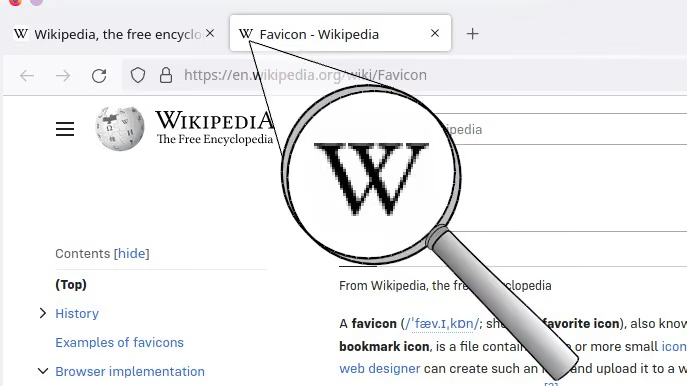
A small icon (favicon) and the site name appear next to the address in search results. A site with no icon, or with one Google can't read, shows up with a grey globe and doesn't stand out.
- The icon should be square. Google recommends at least 48×48 pixels. Point to it in the page's
<head>with<link rel="icon" href="/favicon.png">. - For the site name, add a
namefield in WebSite structured data on the home page. Yoast and Rank Math take it from the site name in their settings.
It can take a few days to a few weeks for the change to show in search.
- The icon should be square. Google recommends at least 48×48 pixels. Point to it in the page's
To doShow the reader what they came for on the page's first screen · Content
After clicking, the reader should see at a glance that they've come to the right place. The first screen should show the page's heading and the short answer to the question, or the product's name, photo and price. A big sliding banner, a long company introduction or an image taking up half the page pushes the information people came for down the screen and sends them to the back button.
Phones and computers are judged separately
According to the leaked documents, clicks are kept separately by country and by device. A page that works well on a computer but is hard to read on a phone can fall behind in phone searches. The Devices tab in Search Console shows how many of your searches come from phones.
To doCompare phone and computer results separately in Search Console · Marketing
In the Performance report, switch to the Devices tab. Compare your average position and click-through rate on phones and on computers. If you clearly lag on phones, open the page on a phone and look for slowness, small text, buttons too close together and pop-ups that cover the screen.
Visits from outside Google are seen too
The leaked documents contain a field that holds a site's total views in Chrome. That suggests visits from social media, email or direct traffic also leave a trace. Nobody outside Google knows how much weight it carries. But one thing is certain: a site people also visit through other routes looks like the site of a real business.
Fake clicks don't work
According to the leaked documents, the effect of clicks piling up from the same source is suppressed and fake ones are filtered out. Sending automated queries to Google is also explicitly banned in its spam policy as "machine-generated traffic". That's why buying clicks is both risky and, most of the time, money thrown away.
What we knowOffers selling click bots can seem to work for a while
Bot clicks sometimes seem to lift a ranking for a short time, because Google's systems can be a little slow to filter them out. But that position doesn't last. When the bot stops or Google filters it out, the ranking returns to where it was, sometimes lower. Meanwhile your analytics data is distorted too, and you can't see which pages really work.
Speed decides between two good pages
Google shows the most relevant page even if its experience is weak. Speed makes the difference between pages of similar quality. But speed's real effect is on the reader: a slow page loses visitors in the first seconds, and those visitors go back to Google.

To doMeasure the site's speed with Search Console and PageSpeed Insights · Software
Google looks at three measures:
- Largest Contentful Paint (LCP): the page's main content should appear within 2.5 seconds.
- Interaction to Next Paint (INP): when you tap a button, the page should respond within 200 milliseconds.
- Cumulative Layout Shift (CLS): content should not jump around while the page loads, and the score should be below 0.1.
To measure:
- In Search Console, the Experience > Core Web Vitals report shows the speed real visitors get on phones and computers, in groups of pages.
- Test a single page at pagespeed.web.dev. The real-user data at the top is the measure that counts. The score below is a lab test that shows where the problem is.
QuestionHow does a site get faster?
These are the jobs that made the biggest difference on the sites we work on. You don't have to do them all at once. Measure first and start with the biggest problem.
To doPrepare pages in advance and serve the ready copy (caching) · Software
If a WordPress page is rebuilt from the database on every visit, the server does the same work from scratch every time. Caching keeps a ready copy of the page and sends it straight to the next visitor. On the sites we work on, this is the single setting that cut load times the most. LiteSpeed Cache works on LiteSpeed servers, and WP Rocket or the server's own cache elsewhere. Cart, checkout and account pages should not be cached.
To doWarm the cache in the background after publishing · Software
When the cache is cleared, the first visitor waits for the page to be built from scratch. Warming the cache means a program opens the important pages one by one right after publishing and stores them. Then the first real visitor, or even Google's crawler, doesn't wait. Most caching plugins have this as a "preload" setting.
To doKeep the server close to your visitors · Software
The distance between visitor and server is a road travelled on every request. If your customers are in Turkey, the server should be in Turkey, for example in a data center in Istanbul, or in one of the nearest large cloud regions such as Frankfurt, Amsterdam or Milan. The same logic applies anywhere: keep the server in or near the country where most of your customers are. On a server on another continent, every request crosses an ocean twice and adds a noticeable wait to every page.
If your visitors are spread across several countries, a content delivery network (CDN) such as Cloudflare serves images and files that don't change from the point closest to the visitor.
To doConvert images to AVIF or WebP and serve them at the right size for the screen · Software
Images are the heaviest part of most pages. Converting PNG or JPEG images to AVIF or WebP often cuts the file size in half or more with no visible loss of quality. Serving the image at the size of the screen matters too: sending a 2,000-pixel image to a 400-pixel phone screen wastes the visitor's data and time. WordPress creates the different sizes itself, and plugins such as Imagify or ShortPixel convert the format.
To doLet browsers keep files that don't change for a long time · Software
The logo, fonts, style sheets and JavaScript files are the same on every page. If the server sends them with the header
Cache-Control: max-age=31536000, immutable, the browser downloads them once and doesn't ask again for a year. From the second page on, the site opens much faster. When a file changes, its name should change too, for examplestyle.v2.css. Most caching plugins and modern site frameworks do this themselves.To doDon't load unnecessary code on the page · Software
Ready-made themes and plugins load the code for features you don't use on every page: unused sliders, social media widgets, chat windows, tracking scripts on every page. Each one is a load the phone has to download and run, and they are the most common reason a page responds slowly to taps.
What to do:
- Delete plugins you don't use. Deactivating them isn't enough.
- In the PageSpeed Insights report, look at the "Reduce unused JavaScript" section to see which files are heavy.
- With plugins such as Asset CleanUp or Perfmatters, load a plugin's code only on the pages that use it.
- Load heavy tools such as a chat window after the page has opened.

To doDon't let ads and pop-ups cover the content · Marketing
A campaign window, newsletter box or ad that covers the screen as soon as the page opens hides the content the reader came for. Google writes that such windows make it harder to understand the content and can lower search performance, and recommends banners that take up a small part of the screen instead.
- For a newsletter or app invitation, use a small banner at the bottom of the screen.
- Show a campaign window not in the first second, but after the reader has spent some time on the page or is about to leave.
- Legal requirements such as age verification are an exception, but they too should show the content without redirecting to a separate page.
Do people search for you by name?
Google puts reliable sources first
Google gives priority to sites seen as reliable sources on a subject. The leaked documents also mention a site-level authority score, but nobody outside knows how it's calculated. What we do know: people searching for a brand's name, the brand being mentioned on other sites and people visiting its site of their own accord are signs that the brand is real and trustworthy.
People pick the name they know in the results
With ten options in the results, people often click the brand they've heard of before, because they trust it. That click feeds back into ranking. Searches for your name tell Google you're a real brand. That's why brand work isn't outside SEO, it sits right in the middle of it.
A brand has to be known before people search for it
Nobody searches for a brand nobody knows. Brand awareness is work that sales, marketing and HR do together, and every point of contact is a reminder: the parcel, the invoice, the job ad, the newsletter, what an employee tells their friends. In the end they all lead to the same place: people typing your name into Google.
QuestionHow does a brand become known?
Brand awareness isn't one team's job. Marketing, sales, HR and every employee each bring your name to someone new. All of the tasks below lead to the same place: people typing your name into Google.
To doBe on social media regularly, with our own content · Marketing
On social media the aim isn't to post every day, it's to post something your customers will remember: how a product is used, the answer to a customer's question, what happens behind the scenes, a newly arrived product. Two or three real posts a week leave more of a mark than ready-made images posted daily. Pick the one or two channels where most of your customers are and be consistent there.
To doAdd your social and video accounts to Search Console and measure them · Marketing
Google lets you track in Search Console how your social and video accounts appear in search. Once you add your accounts, you can see which posts are seen and clicked on Google. Then you know from data, not guesswork, which content makes people search for your brand.
To doRun ad campaigns that are memorable and run for a long time · Marketing
An ad that runs for a week and stops stays in nobody's mind. Brand awareness needs the same message repeated for months, in the same visual style and a recognizable voice. The aim of the ad shouldn't only be sales that day, but putting your name in people's heads. The result of such a campaign doesn't show in the ad dashboard, it shows a few months later as more searches for your name. Google says advertising doesn't directly affect organic ranking. The ad's contribution to SEO is that it makes people search for your brand.
To doMake things people share: tools, maps, calculators · Marketing
People save tools that are useful to them and send them to others: a shipping cost calculator, a size chart, a compatibility tool, a guide map. These pages bring your brand to people who have never heard of it, and next time they type your name into Google.
To doSend your customers a regular email newsletter · Marketing
A customer who bought once or asked for a quote forgets your name after a few months. A short, useful newsletter once a month prevents that: new products, a usage tip, a seasonal reminder. Only send it to people who gave permission, and include an unsubscribe link in every email. A customer who comes back to the site from the newsletter and buys again is exactly the customer who searches for your brand on Google.
To doHave the sales team use the same name and site address in every quote and conversation · Marketing
The sales team is the face of the brand that talks to customers every day. The quote document, the email signature, the WhatsApp profile and the business card should all show the same brand name and the same site address. Sending the customer a link to a relevant page on the site after a call brings them to the site and keeps your name in mind. A sales team that doesn't follow up quotes and answers customers late loses the demand Google brings in.
To doIf you sell abroad, have the site and the brand in that language too · Marketing
A buyer abroad searches for you in their own language and on their own country's Google. A site only in Turkish means you don't appear on Google in that market at all. If you export, prepare at least the product and category pages, the company information and the contact page in that language. Don't publish machine translation without checking it. If technical terms are translated wrong, trust is lost.
To doDescribe the brand well in job ads · People
A job ad isn't only for finding staff, it's also a chance to tell hundreds of people about your brand. Ads on job sites, public employment services and LinkedIn may be where job seekers first hear of your company. Write clearly in the ad what the company does, whom it serves and its site address. People who read the ad get curious and search for the company's name on Google. Everyone who starts the job, and everyone who applies and isn't hired, tells their circle about you, which is why a good ad and a respectful process are part of the brand.
To doMake sure our employees know the company well and describe it well · People
Employees are the brand's most talkative ambassadors: they tell their families, friends and former workplaces about the company. An employee who knows what the company sells, why it's different and its site address will describe it correctly. Give everyone who joins a short introduction to the company and its products, and ask them to write the company name correctly on their LinkedIn profiles.
To doPut the site address and a "search for us on Google" line on packaging, invoices, business cards and email signatures · Marketing
Everything in the customer's hands is a surface that reminds them of the brand: the shipping box, the card inside the parcel, the invoice, the business card, the email signature. All of them should show the brand name and site address in the same form. A small card in the parcel with a usage tip and the site address makes the customer search for you on Google next time they buy.

Measure the searches for your name
The number of searches for your name is the most concrete measure of whether brand work is paying off. As it grows, Google's view of you as a real brand people search for grows stronger too.
To doTrack clicks from searches for your name separately with the branded queries filter in Search Console · Marketing
Since 2025, Search Console can split searches into branded and non-branded. Branded searches include your name, misspellings of it and the names of products unique to you.
- In Search Console, go to Performance > Search results.
- In the filters at the top, choose the branded queries filter. Look at branded and non-branded searches separately.
- Compare clicks from branded searches month by month. If that number grows, your brand work is working.
The filter only appears for sites with enough search data that are added at domain level. If you don't see it, you can check the same thing by hand by searching for your brand name in the Queries table.
What we knowAccording to Google, advertising neither raises nor lowers your organic ranking
Google writes plainly that it gives advertisers no special treatment in ranking and that nobody can pay for a higher position. Advertising's contribution to normal results is indirect: it introduces your brand, and the people who learn about it search for you later.
Your brand must be one clear thing for Google
For Google to recognize your brand as one "entity", your name, logo and accounts must be the same everywhere. A recognized brand appears in search with its logo, its site name and sometimes an information box on the right.
To doUse the same name everywhere: on the site, on social accounts, on your Business Profile · Marketing
Your brand name should be written the same way on your site, your social accounts, your Google Business Profile, marketplaces and invoices. For example, if the company is called "Yildiz Bearings", it shouldn't appear as "Yildiz Bearings Ltd." in one place, "YILDIZBEARINGS" in another and "Yıldız Rulman" in a third. Abbreviations, capitalization and suffixes look like small differences to people, but to Google they can be different names.
Why it matters: to recognize your brand as one "entity", Google wants to see your name with the same details across different sites. If the name, logo, address and phone number are the same everywhere, Google easily connects them to the same business. If they differ, it splits the information and your brand looks weaker in search.
To doGive the site name and company details on the home page with structured data · Software
Two kinds of structured data go on the home page:
- WebSite: the site's name (
name) and, if there is one, a short name (alternateName). Google takes the site name in search results from here. - Organization: the company's official name, logo, address, phone number and the addresses of its social accounts (
sameAs). Google uses this to link your brand's accounts on different sites.
On WordPress, filling in Settings > Site representation in Yoast or Titles & Meta > Local SEO in Rank Math is enough. Check it in the Rich Results Test with the home page's address.
- WebSite: the site's name (
Why does this take time?
A new site needs time to build trust
For a new site, Google has no click data, no links and no brand searches. Each of these builds up over months. That's why starting early is a strategy in itself, and moving slowly in the first months is normal.
What we knowGoogle says there is no waiting period for new sites, the leaked documents show it is cautious
For years Google has said there is no "sandbox" that holds new sites back. The documents leaked in 2024, however, contain a field that records when a domain was first seen (hostAge), and its description says this is used to filter out fresh spam. So new sites may well be treated more cautiously in their first months. There is no verified figure for how many months. The "13 months" often quoted is actually how much data Google's click system (NavBoost) looks at.
To doSet up the site before you need it and start adding content straight away · Management
Starting a site on the day you need sales is starting too late. Buy the domain, put the site live, set up Search Console and add content regularly from the first month. That way, Google getting to know your site, the click data building up and the first links arriving are done by the time you need the sales.
Buying an old domain is not a shortcut
Buying an expired domain that used to belong to a strong site and trying to use that old strength for your own site is on Google's spam list as "expired domain abuse". Google sees the history of such domains and doesn't treat the new content as a continuation of the old site. If you really are buying a domain that suits your brand, check its history on an archive site (web.archive.org): a domain that once hosted spam or illegal content can cause you trouble.
A page's and a domain's history doesn't disappear easily
According to the leaked documents, Google keeps the last twenty versions of an address. A page's or a domain's history stays in Google's memory even after the address changes. That's why redirects from old addresses stay important for years when you move a site or change addresses.
To doIf you have to change domains, use the Change of Address tool in Search Console · Software
If you move the site to a new domain, you need to tell Google separately.
- Redirect every page of the old site permanently (301) to its counterpart on the new site.
- Add both the old and the new domain to Search Console with the same Google account and verify that you own both.
- In the old site's Search Console, go to Settings > Change of address, choose the new site and run the checks.
- Keep the redirects for at least 180 days, ideally much longer. Keep the old domain for at least a year so nobody else can buy it and misuse it.
The tool is only for domain changes. It is not used when moving from http to https or from a www to a non-www address.
To doKeep track of your domain's expiry and keep auto-renewal on · Management
An expired domain goes offline within days, and after a while anyone can buy it. That means everything built up over years can vanish at once. Turn on auto-renewal in your registrar's panel, and make sure the registered email address is one someone reads and the card on file is valid. Put the expiry date in your calendar too.
Don't panic straight after a Google update
Besides large updates, Google also makes smaller ones it doesn't announce. If your traffic dropped, first separate in order whether it's a measurement error, a technical problem or an update. Recovering from a large update often means waiting for the next one.
To doFollow update dates on the Google Search Status Dashboard · Marketing
The dashboard at status.search.google.com lists the updates Google announces with their start and end dates. When you see a change in your traffic, check these dates first. If the change falls within the days an update was rolling out, that's most likely the cause. If not, look for the cause on your own site or in your analytics tool.
To doCompare at least a week after the update has finished · Marketing
While an update is rolling out, rankings can change every day, and changes made during that time blur the picture even more. At least a week after the update has finished, open the Performance report in Search Console and compare with a period of the same length before the update. List which pages and which searches dropped. Look for what the dropped pages have in common: are they all the same type, all thin, all old?
To doWhen traffic drops, rule out three possibilities in order: measurement error, technical problem, Google update · Marketing
- Is it a measurement error? Do Analytics and Search Console show the same drop? If only Analytics dropped, the tracking code may be broken or the cookie consent may have changed.
- Is it a technical problem? Did the number of indexed pages drop in the Pages report in Search Console, is there a warning in the Manual actions or Security issues report, has the site slowed down or started returning errors?
- Is it a Google update? Does the drop match the dates of an update on the Status Dashboard?
Going in order matters. Mistaking a measurement error for a Google update and changing the site means spending money on a problem that doesn't exist.
Which mistakes ruin everything?
A site caught by Google's spam policies falls behind even if it does everything else right
Google's spam list has about twenty headings and keeps growing. A site caught under one of them falls behind, however good its content and speed, or can be removed from the results entirely.
What we knowWhat is on Google's spam list?
The headings in Google's spam policy and what they mean in short:
- Cloaking: showing Google and visitors different pages.
- Doorway abuse: pages multiplied for similar searches that funnel visitors to one place.
- Expired domain abuse: using an old site's strength for unrelated content.
- Hacked content: pages and links an attacker adds to your site.
- Hidden text and links: white text on a white background, text pushed off-screen, zero-size text.
- Keyword stuffing: repeating the same word over and over in an unnatural way.
- Link spam: buying and selling links for ranking.
- Machine-generated traffic: sending automated queries and clicks to Google.
- Malicious practices: malware, unwanted software, breaking the back button.
- Misleading functionality: tools that look like they work but don't.
- Scaled content abuse: producing many pages that add nothing for the reader.
- Scraping: copying and publishing other sites' content.
- Site reputation policy: content placed on another site to benefit from that site's strength.
- Sneaky redirects: sending visitors to a page they didn't expect.
- Thin affiliation: affiliate pages with no information of their own that only send visitors to another shop.
- User-generated spam: spam in comments and forums.
Google also writes that it treats attempts to manipulate its AI answers as spam.
To doRead the spam policies in full once and look at your site through them · Management
Read the spam policy page (developers.google.com/search/docs/essentials/spam-policies) once from start to finish and look at your site with these questions:
- Is there text on the site that Google sees but visitors don't?
- Are there near-identical pages where only a city or keyword changes?
- Has an agency bought links or sponsored articles on your behalf?
- Were the product descriptions produced in bulk with AI?
- Is there unmoderated spam in the comments or forum?
If you answer "yes" to any of these, fix that first. If you've worked with an agency before, ask in writing what they did.
Copying the same page for every city or district counts as a doorway page
Near-identical pages where only a city or keyword name changes are the kind of spam Google calls "doorway" pages. They may rank for a while, but once detected the whole site can suffer.
What we knowExample: "boiler repair London", "boiler repair Manchester", "boiler repair Leeds" pages that differ only in the city name
Google's spam policy gives exactly this as an example: many pages or domains aimed at specific cities or regions that funnel visitors to the same place. These pages give the reader nothing new. They exist only to take up more space in the search results.
To doEither fill city pages with real information or bring them together on one page · Content
If you really have a branch, a team or a warehouse in that city, a page for it can be valuable: the address, opening hours, that branch's team, delivery times for that area, examples of work you did there. If you don't have that kind of information, bring the pages together on one "Areas we serve" page and list the cities there. If you have several branches, opening a Google Business Profile for each is far more effective than multiplying city pages.
Promotional articles bought on news sites are risky
Articles published on a news site for payment with a keyword-rich link inside can break both Google's link spam and site reputation rules. Their real value is appearing in a publication people actually read and introducing the brand to new people.
What we knowPackages of "promotional articles on news sites" can break two rules at once
There is a commonly sold service: getting an article about your company published on a news site with a keyword-rich link inside. In terms of Google's rules there are two problems:
- Keyword-rich links in articles published on other sites are among what Google counts as link spam.
- Placing content on another site to benefit from that site's strength falls under Google's site reputation policy.
Google usually ignores these links anyway. So the link you paid for most likely earns nothing, and at worst creates risk.
To doIf you place a paid promotional article, ask for the link to be marked as sponsored · Marketing
The only legitimate reason to publish a promotional article on a news site is to reach that site's readers, not to climb in Google. If the article is paid, ask for the link in it to be marked
rel="sponsored"and for the article to be labelled as "sponsored" or "advertisement". If the agency won't agree, what it's selling is a link, not readers.
A hacked site resets everything
An attacker can add pages, links or redirects to your site, and Google treats them as your content. Visitors from Google being sent to another site, the browser warning "this site is dangerous" and dropping out of the results are the usual consequences of a hacked site.

To doUpdate the site software, theme and plugins on time · Software
Most WordPress sites get hacked through a hole in a plugin that wasn't updated.
- Keep WordPress core, the theme and plugins up to date. Turn on automatic installation of minor security updates.
- Delete plugins and themes you don't use. A deactivated plugin can still contain a hole.
- Turn on two-step verification for admin accounts and use strong, unique passwords.
- Keep regular backups of the site and database somewhere other than the server. Restoring a hacked site from a clean backup is much faster than cleaning it.
To doCheck the Security issues report in Search Console and your site on Google regularly · Software
On hacked sites the attacker usually adds pages where the owner won't see them: Japanese product pages, gambling or pharmacy pages. To spot them:
- In Search Console, look at Security & Manual Actions > Security issues.
- Search Google for
site:yoursite.comand check the results for pages you don't recognize or titles in a foreign language. - If the number of indexed pages in the Pages report in Search Console suddenly jumps, find out why.
If you find a problem, clean the site or restore it from a clean backup, change the passwords and request a review in Search Console.
Google can take manual action
Besides its automated systems, Google also reviews sites by hand, and since 2026 it can use spam reports for these reviews too. So a competitor's report can also start a review. A manual action is stated plainly in Search Console and isn't lifted until it's fixed.
To doCheck the Manual actions report in Search Console, and request a review once you've fixed the issue · Software
- In Search Console, open Security & Manual Actions > Manual actions. It should say there are no issues.
- If there is an action, Google states the type of problem and which pages it affects: for example unnatural links, thin content or user-generated spam.
- Fix the problem at its source. If it's links, try to have them removed and report the ones you can't remove with the disavow tool. If it's content, fix or remove the pages.
- From the same report, send a reconsideration request with "Request review". Write clearly and honestly what you did. The answer takes from a few days to a few weeks.
A domain that matches the search exactly gives no advantage
Google doesn't give extra credit to domains bought just to match a search exactly. A name like "cheap-bearing-prices.com" becomes a brand neither on Google nor in people's minds. Your domain should be your brand, not the search term.
The bar is higher for health, money and safety topics
Google puts more weight on trust for topics that can affect people's health, money and safety. On these topics, who the author is and what their sources are matters far more than on an everyday subject.
To doShow clearly who writes on these topics and what their sources are · Content
On topics like health, law, finance, tax and safety, wrong information can cause people real harm. So:
- State that the article was written or reviewed by someone qualified in the field: their name, their title and a page about them.
- Give the source of every important claim: official regulations, the institution's own site, a scientific study.
- Show the date and the date it was last checked, because rules change.
- Don't speak with certainty on something you're not sure about. Refer the reader to an expert.
Does everyone see the same results?
Results change with location, language, device and history
Someone searching on a phone in Istanbul and someone searching on a computer in Ankara can see different results for the same search. That's why the answer to "are we first?" isn't in a single screenshot but in the average in Search Console.
To doTrack your position with the Search Console average, not a single screenshot · Marketing
Ranking first in a search on your own phone doesn't mean your customer sees you first. Google also takes into account your location, your language and the sites you clicked before.
- The real measure is the average position for that search in the Performance report in Search Console. It is the average of real searches.
- If you want to check by hand, use your browser's private window. It reduces the effect of your personal history but not of your location.
- If an agency tells you "you're number one" with a single screenshot, ask for the Search Console average.
A search usually shows at most two results from the same site
For a single search, Google usually doesn't show more than two results from the same site, so the results are spread across different sites. That's why writing very similar pages doesn't win extra places. Covering a subject on one strong page works better.
AI summaries, ads, shopping and map boxes push the first result down
The first normal result sometimes ends up below the fold, because the top of the page holds the AI summary, ads, the shopping box and map results. That's why being first may no longer bring as many clicks as before. Each of these boxes has its own door: the Business Profile for maps, Merchant Center for shopping.
To doCheck the AI setting and the visibility report in Search Console · Marketing
Search Console reports how your site appears in Google's AI results and offers a setting that lets you opt out of being used in them. Think carefully before you turn it off: if you do, you won't appear as a source in those results. For most businesses the right call is to leave it on and strengthen the pages with information the summary can't give: your own prices, stock, measurements and examples.
What we knowYou don't need a separate file or markup to appear in AI summaries
Google writes that the normal search requirements are enough to appear as a source in AI summaries: the page must be indexed and eligible to show with a snippet. It also states separately that an llms.txt file has no effect on Google Search. Agencies that add this file aren't doing anything for Google.
ChatGPT and other AIs must be able to read your site too
ChatGPT citing sources in its search depends on a separate crawler. If that crawler is blocked, your site can't appear as a source in ChatGPT's answers. The crawler that collects training data is a different one. Which to allow is a business decision.
To doDon't block ChatGPT's search crawler (OAI-SearchBot) in robots.txt · Software
OpenAI has three separate crawlers, and each does a different job:
- OAI-SearchBot: the crawler that reads your site so ChatGPT can cite it in search. If you block it, ChatGPT can't show you as a source.
- GPTBot: the crawler that collects data to train AI models. Allowing it or not is a business decision.
- ChatGPT-User: the request that arrives when a user asks ChatGPT to open your site.
Make sure there's no
Disallow: /underUser-agent: OAI-SearchBotin your robots.txt file. OpenAI writes that changes to robots.txt take effect in about a day.To doIf you use Cloudflare, check the AI crawler setting · Software
Cloudflare offers a one-click setting that blocks AI crawlers, and on some new accounts it can come switched on by default. If it's on, ChatGPT and similar tools can't read your site. Find the AI crawler setting in the Cloudflare dashboard and see which crawlers it blocks. Allowing search crawlers while blocking only training crawlers is a sensible middle ground for most businesses.
To doMeasure visits from AI tools separately · Marketing
Visits from ChatGPT, Gemini, Perplexity and Copilot show up in your analytics tool as referring sites (for example chatgpt.com). In Google Analytics 4, define a channel group that collects these sites, or filter the referral report by these names. Then you can see how many visits come from AI tools and how much those visitors buy.

Showing up on maps is a separate door: Google Business Profile
Map positions can't be bought. Google's own advice is to verify the business, keep the information complete and accurate, collect reviews and reply to them, and add photos and videos. For a local business, maps can bring even more customers than the normal results.
What we knowGoogle ranks map results by relevance, distance and prominence
- Relevance: how well your profile matches what someone searches for. Category and description matter here.
- Distance: how far the business is from the person searching. You can't change this.
- Prominence: how well known the business is. Google writes that the number of reviews and the rating affect this too, and that more reviews and good ratings can help local ranking.
Google also says plainly that there is no way to pay for a better position on the map.
To doWrite the business name as it is on your sign, without adding keywords · Marketing
The name on your Business Profile should match the name on your sign, your invoices and your site. Writing "Yildiz Bearings - Cheapest Bearings London" instead of "Yildiz Bearings" breaks Google's rules and can get the profile suspended. If competitors do this, you can report it with the "Suggest an edit" option on Google Maps.
To doKeep address, phone, opening hours and category complete and the same as on your site · Marketing
Google's own advice is to keep the profile complete and accurate. Pay attention to:
- Choose the primary category that best describes your business and add more categories if needed. Category is one of the most important fields for deciding which searches you appear in.
- Address and phone number should be exactly the same as on your site's contact page.
- Enter special opening hours for public holidays.
- Tick attributes such as parking, wheelchair access and card payments.
- Add your site's address to the profile.
To doAsk customers for reviews, and don't give gifts in return · Marketing
Google lets you ask real customers for reviews and recommends it. But some things are banned:
- Giving discounts, gifts or money in return for a review.
- Asking only happy customers for reviews and keeping unhappy ones away.
- Setting staff targets for a certain number of reviews.
- Fake reviews written by staff, family or an agency.
How to ask:
- Find the review request link in your Business Profile and copy it.
- Put the link in the thank-you message after a sale, at the bottom of the invoice or on the card in the parcel (as a QR code).
- A simple line like "Sharing your experience helps others" is enough. Don't tell the customer what to write.
It's natural, and useful to readers, for people to mention the product or service, where they came from and their experience in their own words.
To doReply to every review, especially negative ones, calmly and concretely · Marketing
Google writes that replying to reviews shows you value the customer's feedback. Your reply is read not only by that customer but by everyone who looks at your profile.
- Reply to a positive review with a short thank-you and, if you can, a personal detail.
- Reply to a negative review without getting defensive: acknowledge the problem, say what you did or will do, and give a way to get in touch.
- Don't write the reviewer's personal information, order details or identity in your reply.
- Report a review that breaks the rules (abuse, fake, a competitor's review) to Google instead of replying.
To doAdd real photos and videos · Content
Add real photos to your profile that show the inside and outside of the premises, your team, your products and the work you do. An outside photo showing the sign and the entrance makes it easier for customers to find you. Don't use stock photos. Add new photos regularly so the profile looks alive. There is no statement from Google that adding location data to photos helps.
Shopping results have their own door: Merchant Center
Free product listings are available in Turkey too. Merchant Center is a separate door into Google's shopping results, Images and Lens, with its own rules. A shop that follows them can appear in the shopping box even if it isn't first in the normal results.
What we knowHere you work with Google directly: if the data breaks the rules, the product isn't shown at all
Google checks the product data you send to Merchant Center. If the price doesn't match the site, if there is text or a logo on the image, if there's no return policy, the product is rejected. Free product listings can appear on Google Search, the Shopping tab, Google Images, Google Lens, Maps and YouTube.
To doProvide sharp images without text or logos, at least 500×500 pixels · Content
Merchant Center asks for product images where the product is sharp and fully visible, with no promotional text, watermarks or logos, at least 500×500 pixels. From January 31, 2027 Google requires this size for all products. A white or plain background is the safest choice. Add extra images taken from several angles too.
To doKeep price and stock the same as on the site and up to date · Software
If the price in Merchant Center differs from the price on the site, the product is rejected, and if it keeps happening the account can be suspended. Update the product feed at least once a day. When you run a sale, send the sale price in its own field (
sale_price). When stock runs out, set the availability to "out of stock" instead of deleting the product.To doPrepare a complete product feed: brand, barcode, category, shipping, returns · Software
For a product to look good on Google, these should be filled in the feed: title, description, brand, barcode (GTIN), Google product category, price, availability, shipping cost and time, and return conditions. Always enter the barcode for products that have one, because Google recognizes the product by that number. You only need to enter shipping and returns once, in the account settings in Merchant Center.
To doCheck that the plugin that sends your products has moved to Google's new system (Merchant API) · Software
Google shut down the old system for sending products to Merchant Center (Content API) in August 2026. If the plugin you use for WooCommerce, ikas or Shopify hasn't moved to the new system (Merchant API), your products may not be updating. Check the last update date of your products in Merchant Center. If it's old, update the plugin or replace it.
Appearing in Discover takes a large, real image
You don't need any special markup to get into Discover, the feed Google suggests on phones. The page only needs to be indexed and follow the rules. A large image and a headline that doesn't exaggerate improve the chances.
To doMake cover images at least 1200 pixels wide · Content
Discover is a feed in the Google app and on Google's page on phones that suggests content to people before they search. Google says content with large images gets more clicks there. The cover image should be at least 1200 pixels wide and the page should allow the
max-image-preview:largesetting. On WordPress, Yoast and Rank Math add this setting by themselves. Use a real photo that shows the subject instead of images built mostly from logos or text.To doDon't use exaggerated, clickbait headlines · Content
In Discover, curiosity-bait headlines like "You won't believe this" and images that exaggerate the content are on Google's warning list. The headline should say plainly what the article covers. Discover traffic swings up and down, it can be heavy one day and gone the next. Don't count on it when you plan.
Comment and form spam pollutes the site
Spam links and pages added by visitors lower the site's quality. Google lists this separately as "user-generated spam" and holds the site owner responsible.
To doModerate user comments and mark the links in them · Software
Spam comments and forum posts left by visitors add links and pages to your site that Google doesn't like.