Why is my website not showing up on Google?
How long a new site takes to get into Google, which settings hide a page, and why an indexed page may not appear. Find the cause in Search Console.

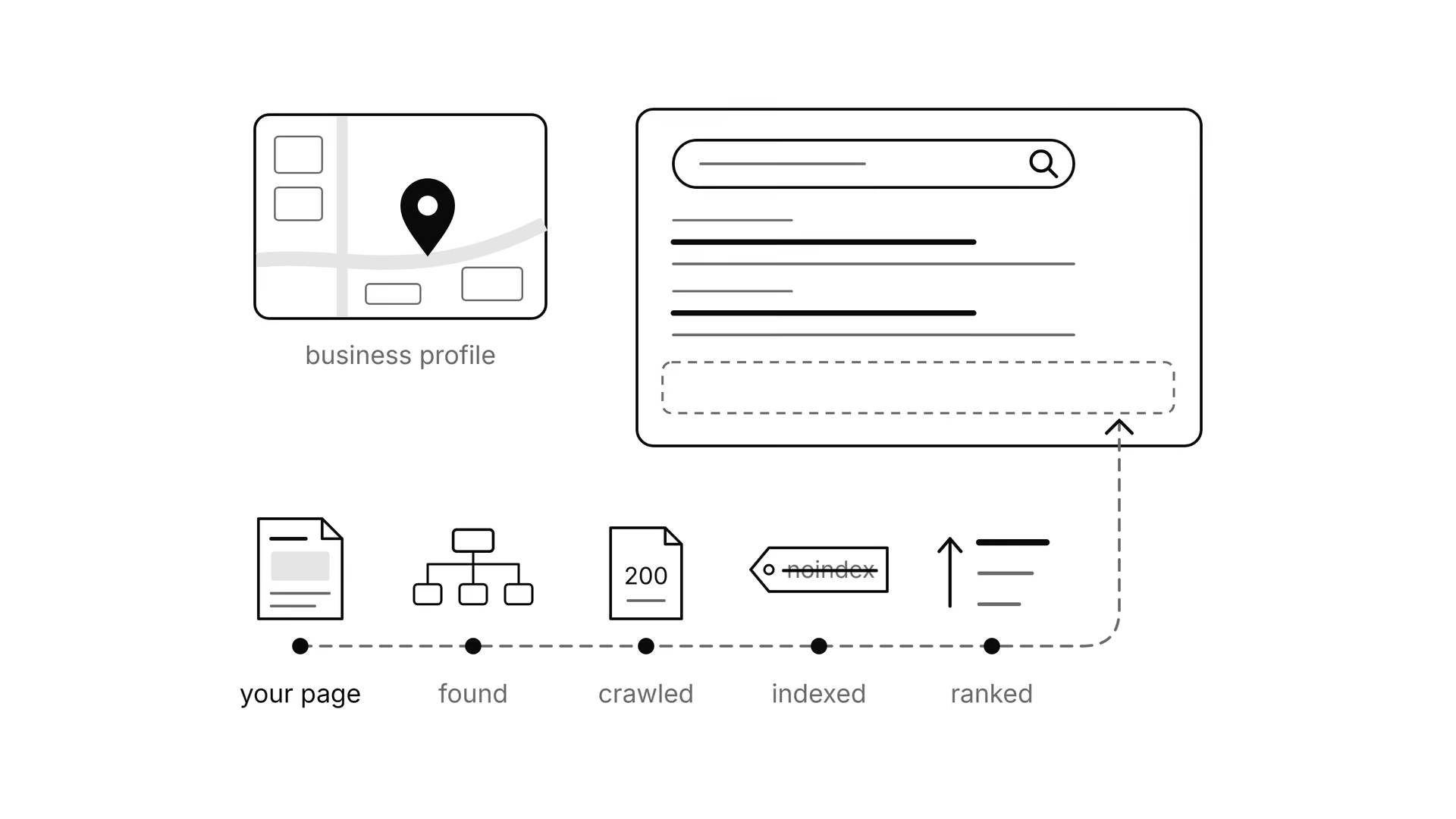
Most often it is one of three things: Google has not found your page or added it to its index yet, a setting is hiding the page from Google, or the page is in the index but other pages answer the searcher better. You do not have to guess which; Google Search Console tells you for every page. A new site can take days, sometimes weeks, to get indexed, and Google does not promise anything about it. Top positions are a longer job: you earn Google's trust by keeping a site alive, not by opening it and leaving it.
How do I know whether my site is on Google?
The quickest check is to search Google for site:yourdomain.com; if results appear, your site is in the index. According to Google this list is not always complete, so for a definite answer you need Search Console. Add your site to Search Console and enter an address in the URL Inspection tool, and Google shows whether that page is in the index and, if it is not, why. One subtlety: a result saying the page is indexed does not mean it will appear in searches; it only says that Google has added it to its index.
How long does it take a new site to get into Google?
There is no single answer. Google's own pages say that crawling can take from a few days to a few weeks, and Google makes no prediction about when, or even whether, a page will be indexed. The same page names the most common reason too: the site is very new. You can ask Search Console to crawl a page, but the request does not guarantee indexing, and requesting the same address again and again does not speed things up.
A sitemap helps as well: it tells Google which pages you have. According to Google, it is especially useful for sites that are new and get few links from other sites. But a sitemap does not guarantee indexing, and it does not raise your rankings either.
Which settings hide a page from Google?
Sometimes the cause is the site itself. Under Google's technical requirements, a page that cannot be seen without logging in is not crawled, and only a page that loads successfully (returns HTTP 200) is indexed. A page blocked by a robots.txt rule or a noindex tag is not indexed. A common mistake here: for noindex to work, Google has to be able to crawl the page; if you also block the same page in robots.txt, Google never sees the noindex. Times when the server returns errors (5xx), and a page that names another page as its canonical address (the preferred address for that content), also leave a page out of the index; in the second case Google indexes the address the page points to. On a newly launched or migrated site, check these settings first; a noindex put in during development and forgotten at launch is a mistake we have run into ourselves. We check these settings and the index status in Search Console page by page as part of SEO and Google visibility work.
Two status names in Search Console's Page indexing report confuse people most. "Crawled - currently not indexed" means Google visited the page but did not index it; Google gives no reason for this, and says there is no need to resubmit the page. "Discovered - currently not indexed" means Google knows the address but has not crawled it yet; the typical reason Google gives is that it postponed the crawl to avoid overloading the site. Not every address needs to be in the index either: in Google's words, an address that is not indexed for a good reason is not a problem.
I'm indexed, so why am I not near the top?
Here the work moves from technical settings to content. Google's helpful content guide spells out the questions you should ask yourself: does the content offer original information or analysis, does it carry the experience of someone who has actually used the product or service, is it clear who wrote it and who the site belongs to, does the site have a clear focus. A small business has a natural advantage here: it knows what it sells better than anyone. Writing on a product page how the product is used and which questions come up most often does far more than copying the manufacturer's text. The same guide draws a line too: changing the dates on pages to make them look "fresh" does not work. How product pages stand out in search with their price, stock and reviews is covered separately in our note on how products stand out on Google.
Internal links are part of this work. According to Google, every page you care about should be linked from at least one other page on your site, and the link should be a plain <a href>; Google uses links both to find new pages and to understand what a page is about. That is why links from a category page to a product, from an article to a related product, and from a product to a similar one are not decoration. On a veterinary clinic website we reviewed, three service pages were live and in the sitemap, but nothing in the menu or on the home page linked to them. If few other sites link to you, Google may find your site later; promoting new content, according to Google, gets it discovered faster.
Does changing platform make a difference?
It can. On sites we moved from ikas to custom software, impressions and clicks in Search Console rose after the move. We do not put this down to a single cause: during the move we also handled the address structure, the structured data of the product pages, the language versions and the Merchant Center connection together. Some of these can be done on a ready-made platform too; the difference is that with custom software all of them are in your hands. What is a must in a move is that the old addresses are permanently redirected to the new ones; otherwise the visibility you have built up is lost. We explained how this is done in our note on SEO when you change platform.
How do you appear on Google Maps if you are a local business?
If you have a shop, an office or a service where you go to the customer, Google Business Profile is the way to appear on Maps and in the local results in search. If you sell only online and have no address a customer can visit, you cannot open a profile; Google does not accept a rented mailing address either. Google ranks local results by relevance, distance and prominence, and the ranking cannot be bought. The number of sites linking to your business and the number of reviews are among the things that shape prominence; profiles with complete and up-to-date information show up more often. Asking your customers for reviews is allowed, and Google gives you a link or a QR code for it. But giving a discount or a gift in return for a review is against Google's rules. We open the profile and keep its information up to date as part of our Google Business Profile work.
What should I do after the site goes live?
Launching a site and walking away is like opening a shop and keeping the shutter down. Google's trust is built with time and effort. First the site has to stay up and stay safe: according to Google, a site that has not been hacked and is open when Google wants to crawl it is one of the conditions for staying in the index. Product prices and stock have to stay current, new questions from customers have to be answered, and those answers should become articles on the site. After an order, send your customers the link to the product page and to your review page, and share product links on social media. These feed each other: a new article is a new internal link, a new review is new trust, a shared link is a new visitor.
Advertising is the step after that. Starting ads before you have a site that can hold visitors means sending them away at the door. Organic growth is slow, but it accumulates, and it is a pleasure to watch.