A veterinary clinic's website: three service pages that the menu never links to
The clinic is open around the clock and has a lot to show, but its pet grooming link is broken, three service pages cannot be reached from the menu and a typo sits in the most visible spot.

We reviewed the website of a veterinary clinic that is open around the clock, from the outside, the way a pet owner and Google see it. The clinic has a lot to show: intensive care, a pick-up service, grooming and a pet hotel. Most of it is on the site, but some of it cannot be found from the menu and some sits behind a broken link.
We also found a gap on the security and email side. We do not publish it here. We reported it to the site's owner directly.
What we would fix first. Same-day work: the typo, the typeface, the broken links, labelling the phone numbers and the page titles. The most valuable work is making the three hidden service pages visible and giving every page the heading, description and clinic details Google reads. That is what will bring the clinic forward in searches for a local vet, a 24/7 vet or pet grooming.
Only public pages, page source and public DNS records were reviewed. No system was logged into and no form was submitted.
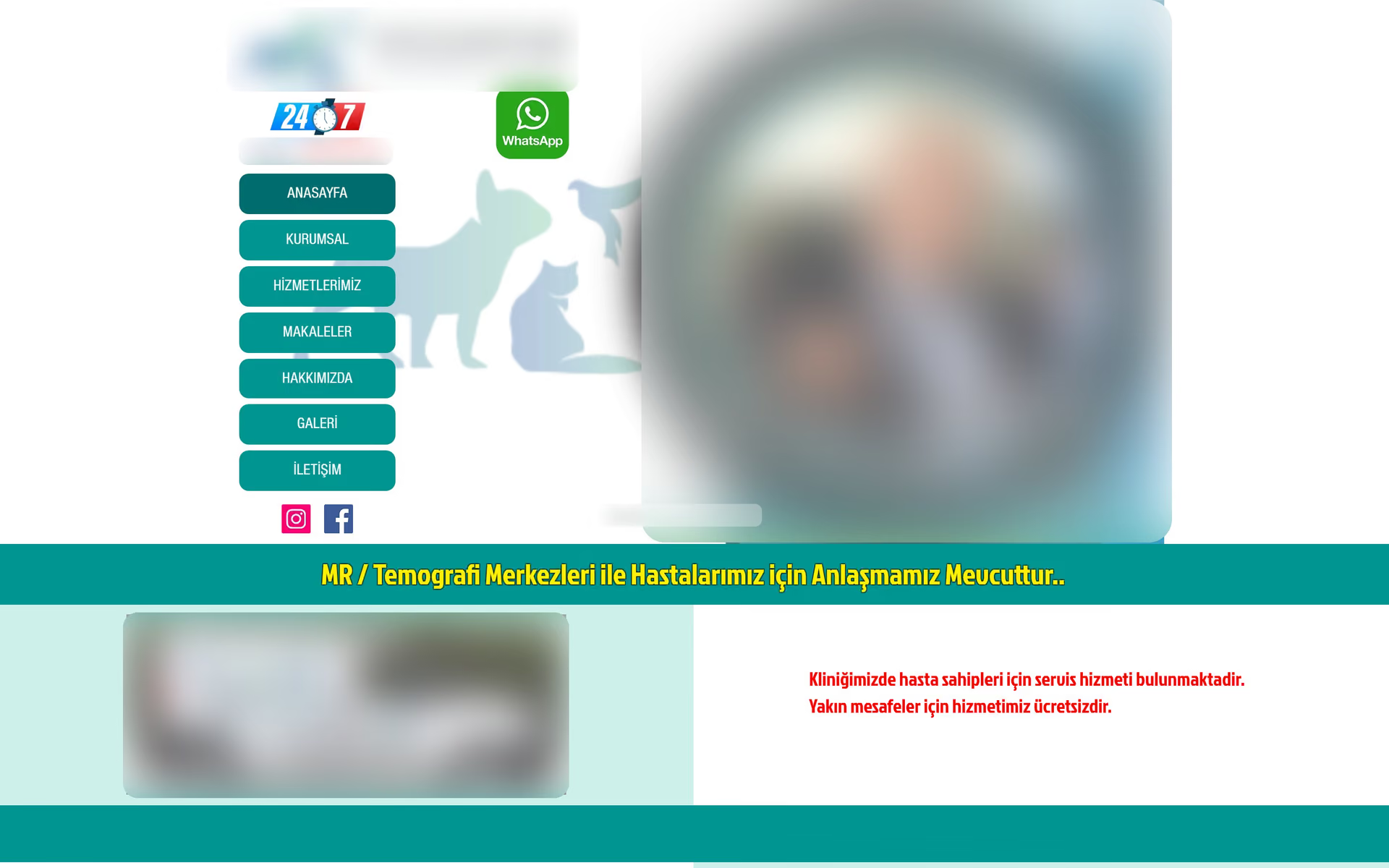
1A typo in the most visible spot
- What is wrong
- The banner at the top of the home page reads "MR / Temografi" in Turkish. The correct word is "Tomografi", tomography.
- What it costs
- A clinic that provides medical care misspelling a medical term undermines trust in the first second.
- How to fix it
- Correct the word. A five-minute job.
2The typeface shows the wrong letters
- What is wrong
- In the typeface used for headings, the letter "v" looks like a "u". The text is spelled correctly, but on screen it reads "Meucuttur" and "Randeuu" instead of "Mevcuttur" and "Randevu".
- What it costs
- Visitors take it for a spelling mistake. The same typeface is used in other text on the site.
- How to fix it
- Switch to a typeface that renders Turkish characters and the letter "v" properly.
3Five different phone numbers on the home page
- What is wrong
- The home page links to five separate numbers. The formats are mixed too, one is written "+ 90" with a space.
- What it costs
- The caller cannot tell which number is for appointments, which for emergencies and which for the pet shop.
- How to fix it
- Label what each number is for and write every link in one format (+90...).
4Three service pages cannot be reached from the menu
- What is wrong
- The Pet Grooming, Pet Hotel and Pet Shop pages are live and listed in the sitemap, but nothing in the menu or on the home page links to them.
- What it costs
- The clinic offers these services but visitors cannot find them. The pages are also weak in Google because the site itself never links to them.
- How to fix it
- Add a "Services" submenu and link the three pages from it.
5No page has a main heading
- What is wrong
- None of the site's 10 pages has an H1 main heading.
- What it costs
- Google cannot read what a page is about from its heading. For searches like a district name plus "24/7 vet", the page sends a weak signal.
- How to fix it
- One H1 per page saying what the clinic does and where it is.
Other findings
6The pet grooming link on the home page is broken
- What is wrong
- The link to the pet grooming site on the home page opens Wix's "This domain isn't connected to a site" error page. The domain points at Wix but is not connected to any site.
- What it costs
- Someone interested in the service lands on an error page and leaves.
- How to fix it
- Connect the domain to the grooming page, or point the link at the Pet Grooming page on the site.
7A partner link is dead
- What is wrong
- The domain of a site linked from the home page as a partner no longer responds at all.
- What it costs
- Broken links strengthen the impression that nobody looks after the site.
- How to fix it
- Remove or update the link.
87 of 10 pages have no Google description
- What is wrong
- The Services, Articles, About, Gallery, Contact, Pet Grooming and Pet Shop pages have no description tag. The home page description trails off with "..", and its title contains the full street address.
- What it costs
- Google shows a random piece of text for those pages. The clinic's strongest fact, that it is open around the clock, does not appear in the search result.
- How to fix it
- A description of about 150 characters per page naming the service and the area, and a short title for the home page.
9Google cannot read the clinic's details from the page
- What is wrong
- The home page has only "WebSite" structured data. No veterinary or local business details, no address and no opening hours.
- What it costs
- Google cannot confirm from the site that the clinic is open 24/7, where it is or what its number is.
- How to fix it
- Structured data of the veterinary clinic type with address, hours and phone.
10No share image
- What is wrong
- No page defines a share image (og:image).
- What it costs
- When someone shares the site on WhatsApp or social media, a bare link without an image appears.
- How to fix it
- A 1200×630 pixel share image of the clinic building or logo.
11The address link on the Pet Shop page is a search result
- What is wrong
- The address link does not go to the clinic's Google Maps profile but to a long Google search address copied from someone's browser.
- What it costs
- The link may not show the same result every time, and it does not look professional.
- How to fix it
- Point the link at the permanent address of the Google Business Profile.
12The contact page has no form
- What is wrong
- There is no form on the contact page for leaving a message. The only written channel is a personal email address.
- What it costs
- A pet owner who wants to write outside opening hours finds no route other than phone and WhatsApp.
- How to fix it
- A short contact form and an email address on the clinic's own domain.
13Small details that catch the eye
- What is wrong
- The Contact page title is spelled without the Turkish "ş". The site was republished in May 2026, yet the footer still says "Copyright © 2021". On desktop, 5 of the 23 images on the home page have no description text.
- What it costs
- Each one is small, but together they suggest nobody is looking after the site with care.
- How to fix it
- Fix the title, the year and the image descriptions. An hour's work.
Get a free review of your site
Leave your site's address and we will look at it the same way. We write our findings to you privately and never publish your site here.