How do you get your products to show up on Google?
Product schema, Merchant Center, reviews, price and stock. What it takes for your products to appear in search, Images and Shopping with their price.

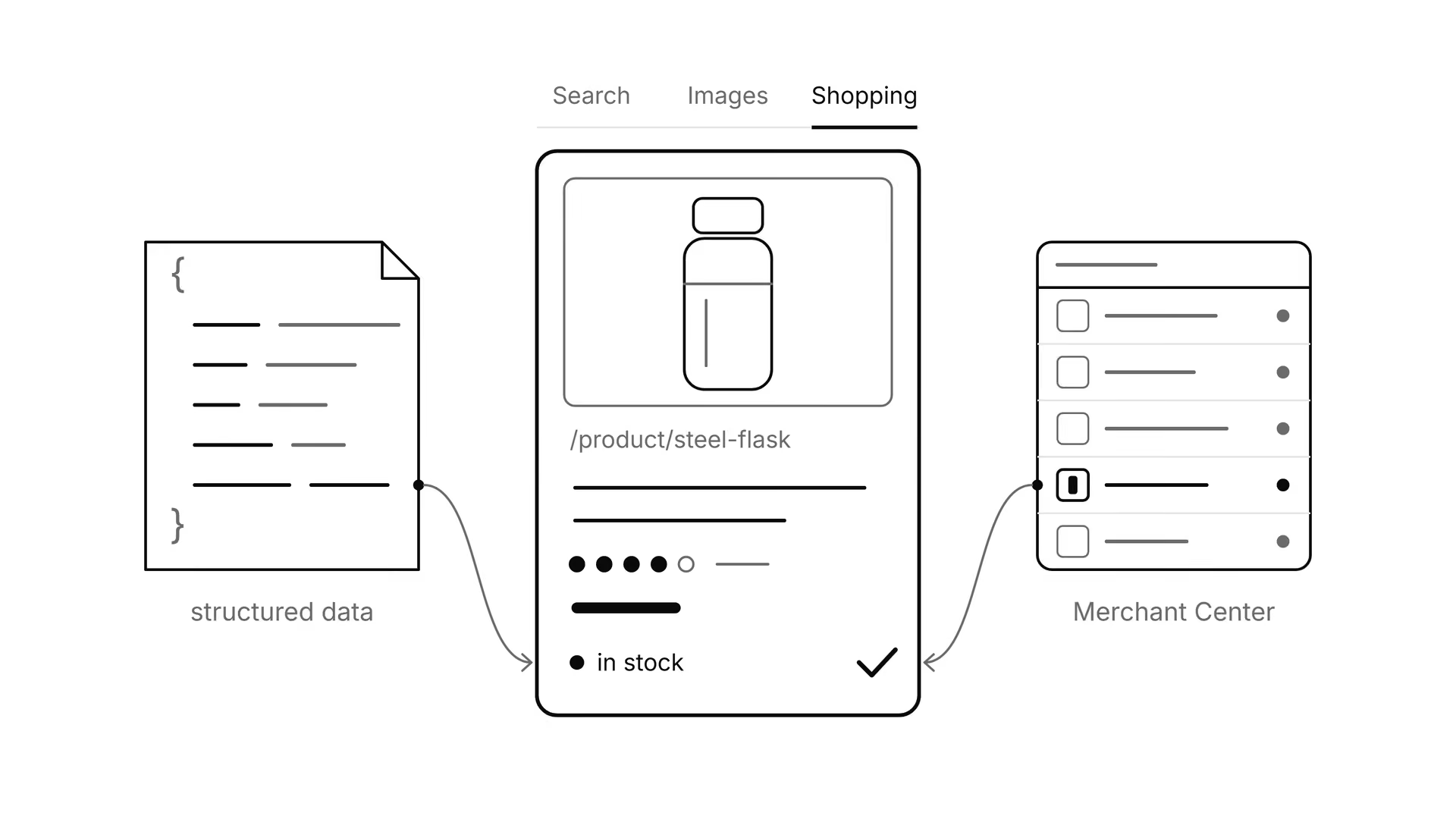
You describe a product to Google in two ways: structured data on the product page (Product schema) and the product feed you give Google Merchant Center. When the two work together, your product can appear for free in search, in Images and in the Shopping tab, with its price, stock status and stars. Google does not guarantee it, but it is open about one condition: what you tell Google has to match, exactly, what the customer sees on the page.
What is product schema, and what does it do?
Product schema is structured data in the page's code that tells Google "this is a product, this is its name, this is its price, it is in stock." Google shows two kinds of product result. Product snippets are for pages where the product cannot be bought, a review article for example. Merchant listings are for pages where it can. A product page in an online store is the second kind, and according to Google's documentation it requires the product's name, image, price and currency. Availability and the barcode number (GTIN) are not required but recommended; the price also has to be greater than zero. The image has to show the product that is marked up.
How do stars and reviews appear in search?
If a product page has reviews and a rating, you can mark them up with structured data too. The condition, as Google puts it, is that the reviews are clearly visible to users on the page being marked up; a rating that exists only in the code does nothing. Google also has a restriction: reviews you collect on your own site about your own business (the LocalBusiness or Organization types) are not eligible for a star result. Products, though, are among the types that can be rated. So keeping real customer reviews visible on the product page works for the customer reading it and for Google. How to ask customers for reviews is in our note on sites that do not appear on Google.
What does Merchant Center do, and is it free?
Merchant Center is a free panel where you give Google your product feed. With free listings turned on, your products can appear in the Shopping tab, in search, in Images and in Lens without paying for ads; Google does not guarantee they will be shown. Merchant Center is not required to appear in search, but some surfaces, the Shopping tab among them, need it. According to Google's list of countries, free listings are available in Turkey and the Turkish lira is supported. Google also recommends using structured data and a Merchant Center feed together; the data on the page also helps confirm that the feed is consistent with the site.
The most common Merchant Center problem is a feed that does not match the page. According to Google, a mismatch in availability gets the product disapproved. Merchant Center has automatic updates for this, and they are on by default: it reads the price, the sale price and the availability from your product page and corrects them. What it reads is the structured data on the page. There is one subtlety: Google wants this data to be in the page's initial HTML, and it does not use data generated later by JavaScript for this. That is why it is worth checking, whether you run a ready-made platform or your own software, that your product page sends this data ready-made from the server. We set up the feed and the page data to match as part of Google Merchant Center setup. How a sold-out product should appear on the page is in our note on out-of-stock products.
What should product photos look like?
According to Merchant Center's image rules, a product image must not carry a watermark, promotional text or a logo, and it must show the product that is actually sold; a representative image or a placeholder is not accepted. Because free listings also appear in Images and Lens, a product photo is not decoration. It is the product's face on Google. In product photography work we keep these rules in mind before the shoot.
Why do URL structure and language versions matter?
Google's advice is plain: use readable words in the address instead of long numbers, and separate words with hyphens, not underscores. /product/steel-thermos-500-ml instead of /product/12345 tells both the customer and Google what the product is. If your site is available in more than one language, each language version should point to the others with hreflang. The links have to be reciprocal: if two pages do not point to each other, Google ignores the tags. Each page should also list itself, and a default (x-default) should be given for visitors whose language matches none of the versions.
Last, how products link to each other and to articles. Links from a category page to a product, or from a guide to a related product, tell Google what a product is about.