How should you show an out-of-stock product? Hide it or ask for a quote?
Hiding a product you can still supply costs you its page and its place on Google. How to show one that is out of stock, has no current price or is discontinued.

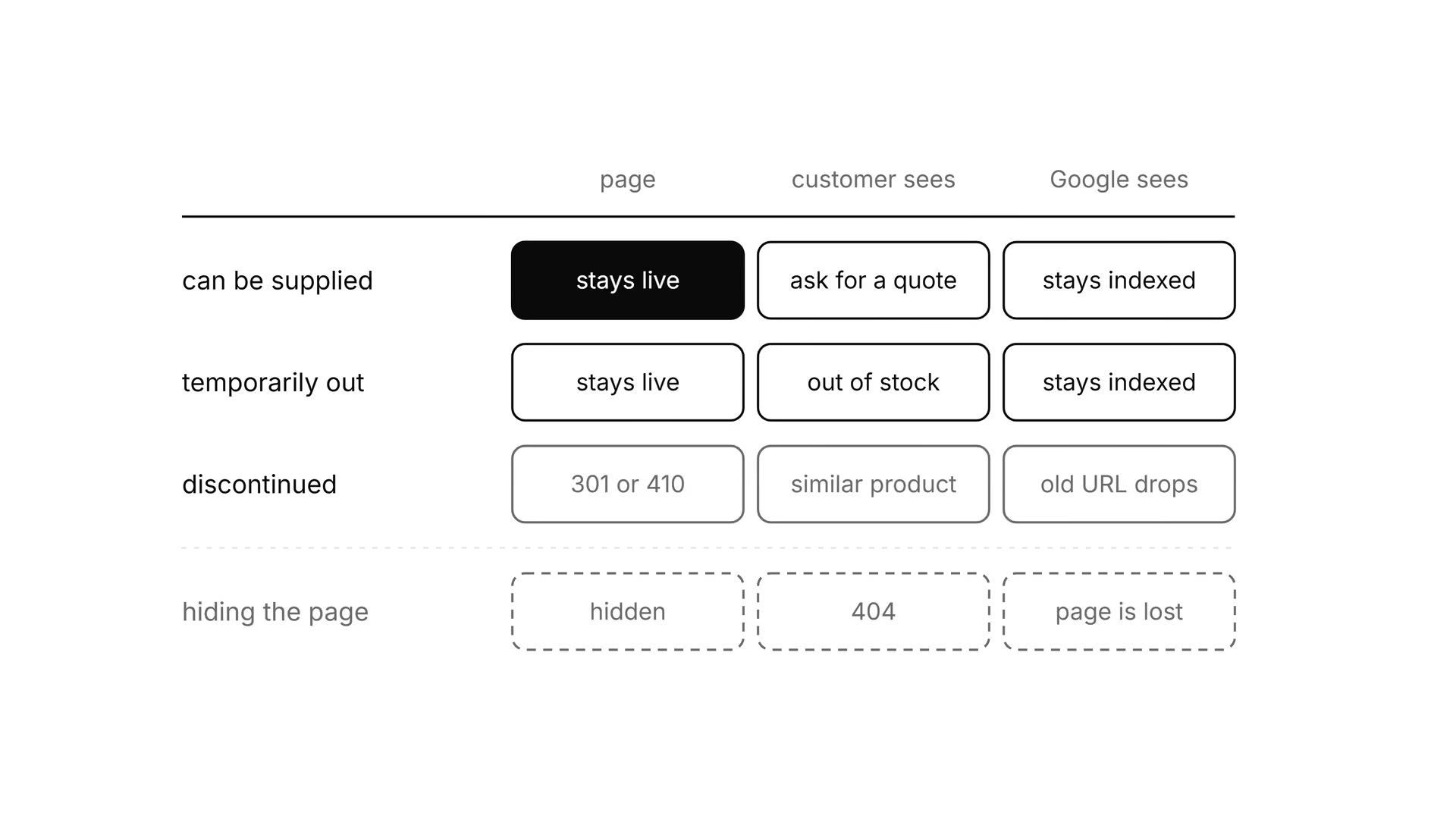
If you can still supply the product, do not hide it. Show it. Even when it is out of stock, its page should stay live and say "out of stock" or "supplied to order", and the customer should be able to ask for a quote. When you hide a product, that page's address usually lands on a not found (404) page, and the place it built up on Google is lost. Showing it keeps your range wide and helps you bring the manufacturer and the buyer together at the right point. Only a product that is really discontinued is handled differently.
Why does hiding an out-of-stock product do harm?
Google's advice here is clear. In its guide for sites that pause their business temporarily, it recommends keeping an out-of-stock product's page live and marking it as out of stock, instead of removing it. If you remove the page, an address that returns 404 is dropped from the index, according to Google, and it is crawled less often. Even if you put the page back when the product returns to stock, it takes time for Google to find it again, recognise it and rank it. Links to that product from category pages, articles and other sites go to waste in the meantime.
There is the customer's side too. Someone who searches for a product and arrives on your site sees "we can supply this product for you" rather than "this product is not available", and the business does not end there. With spare parts, industrial products and anything ordered from the manufacturer especially, every product you show in the catalogue is a reason for a customer to ask you a question.
How should it be marked on the page and on Google?
The page, the product's structured data and the product list you give Merchant Center should all say the same thing. Google's merchant listing documentation accepts several values for stock status. The common ones are in stock (InStock), out of stock (OutOfStock), back order (BackOrder) and pre-order (PreOrder). In Merchant Center, giving the date a product will be ready is mandatory for back order and pre-order statuses, and that date must be visible on the page too. Pre-order is for new products that have not been released yet. A product that is out of stock but that you still take orders for counts as back order.
In Turkey there is a legal side to this as well. Under the Consumer Protection Law, a good displayed in a shop window, on a shelf or electronically cannot be refused for sale unless a notice on it says it is not for sale. So turning down a product that looks addable to the cart on your site by saying "out of stock" afterwards can cause trouble. State it clearly on the out-of-stock product's page, and either turn off the add-to-cart button or put "ask for a quote" in its place. We set up stock status, the cart button and the quote flow to this rule as part of ecommerce development.
How do you show a product with no fixed price?
For products whose price changes with the supplier, the exchange rate or the quantity, "ask for a quote" is a good route. But it has a cost on the Google side. Google wants a price in order to show a product in shopping results. In merchant listings the price is required and must be greater than zero, and Merchant Center does not show a product without a price. A product page with no price can still appear in search, and if it has reviews and a rating it can even get a product snippet, but it cannot appear in the Shopping tab. Writing a price that is not visible on the page only into the structured data is not a solution either. Google wants what is on the page and what is in the data to be the same. If the price follows a supplier's list and the exchange rate, there is another way: calculate it automatically from the supplier's file, with the exchange rate and your margin. We cover this on our supplier and dealer XML feeds page.
If you sell to consumers there is one more rule. The Distance Contracts Regulation requires the total price, with all taxes included, to be communicated to the consumer before the contract is formed and to be shown again separately right before payment. In our reading, a "request a quote" flow meets this if the price is given to the customer in writing before they approve. Taking an order and payment without showing the price at all does not. The regulation applies to consumers. A B2B site that sells only to companies is in a different position, but confirm that with your lawyer as well.
What should happen to a product that is permanently discontinued?
Hiding is right here, but how you hide it matters. If the product will never be sold again and there is a replacement, send the old address to the new product with a permanent redirect (301). If there is no replacement, according to Google the old address should return 404 or 410. Redirecting every removed product to the home page looks easy, but Google treats that as a "soft 404". In Merchant Center, too, a discontinued product is not left as "out of stock" but deleted from the list. We covered these decisions in bulk, as they come up when a site is moved, in the note on whether changing platforms hurts SEO.
We explained how products appear on Google with their price and stock in the note on getting your products to show up on Google.