How do you set up abandoned cart emails, and when should they go out?
Send the first reminder about an hour later, the second the next day. Who you can reach, what goes inside, discounts, and stopping once they buy.

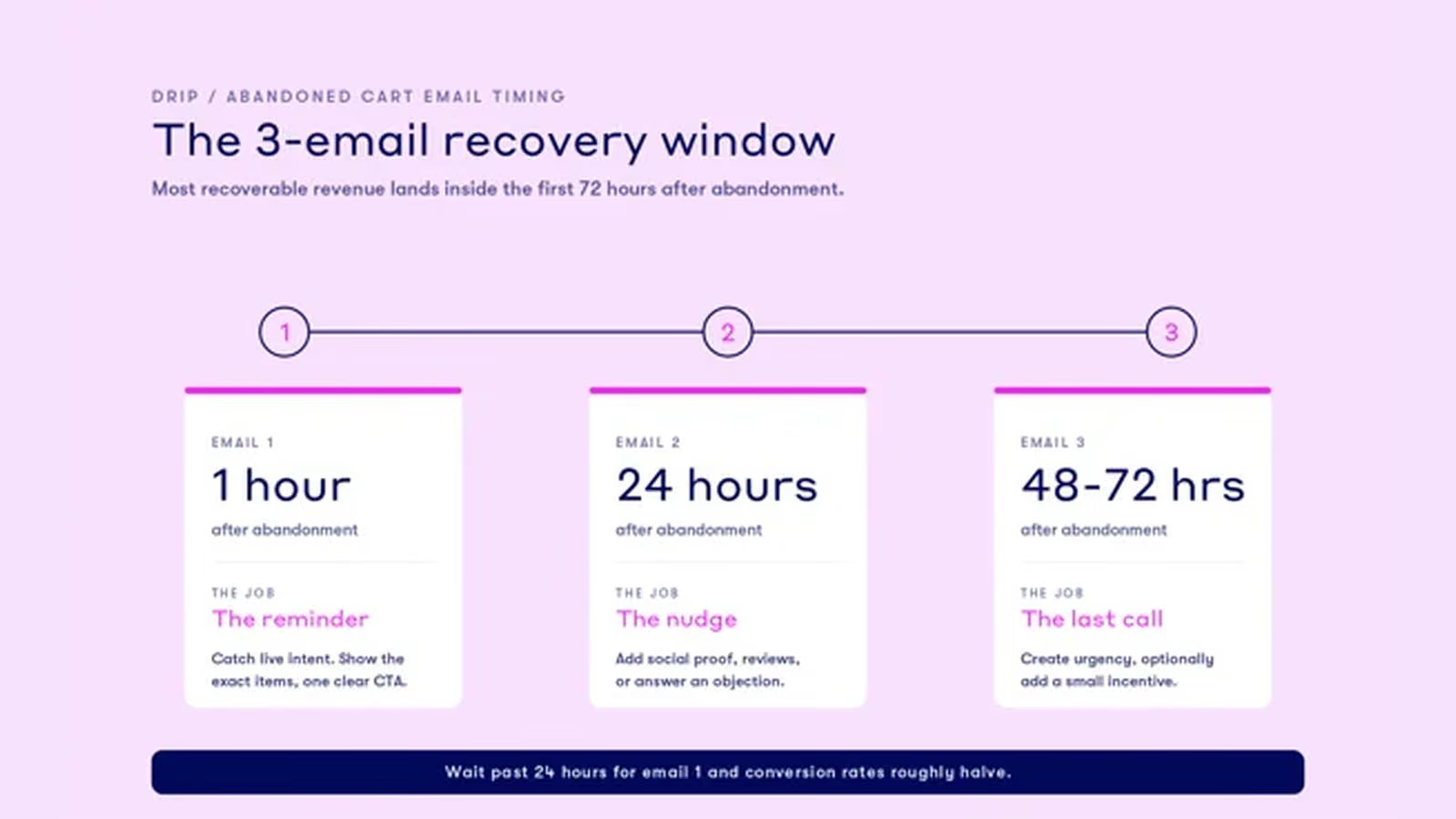
Send the first email about an hour after the cart is left, and the second one the next day. If you like, add a last reminder somewhere between 48 and 72 hours. More than that wears people out. A reminder can only go to a customer whose email you know: someone who was logged in, or who typed their email at checkout. Shopify and ikas switch this on from the dashboard, WooCommerce needs a plugin. The moment the customer completes the order, the sequence has to stop.
Which customers can you actually remind?
For most visitors who add something to the cart and leave, you have no address. Emails get captured in two places:
- A logged-in customer. The store already knows who they are.
- A guest who types their email at checkout. The address is saved even if the order isn't completed.
That's why putting the email field at the very top of the checkout page pays off. Even if the customer leaves before reaching the address and card fields, you still have their email.
Shopify treats a checkout as abandoned when it stays incomplete for more than ten minutes after the customer enters their email. If the customer gave a phone number instead of an email, no email goes out. ikas's help page (ikas is a popular ecommerce platform in Turkey) also lists an email entered at checkout as the condition for a reminder.
How do you turn it on in each platform?
| Platform | Where | Watch out for |
|---|---|---|
| Shopify | Apps > Messaging > Automations, "Abandoned checkout" template | By default it only goes to customers who accepted marketing. |
| ikas | Automations, cart reminder section | The delay is set in hours per flow, up to 24 hours. |
| WooCommerce | Through a plugin | Test whether the plugin recognises guests. |
According to Shopify's automation page, abandoned checkout emails go by default to customers who accepted marketing. In ikas you choose the audience too, and one of the options is customers with email marketing consent. There's a reason for these settings. In Turkey, Law No. 6563 on electronic commerce requires the recipient's prior consent for electronic messages sent for commercial purposes, and an easy, free way to refuse them in every message (articles 6 and 8). That's why the consent box sits on the checkout page and the unsubscribe link sits at the bottom of the email. These consents are also kept in a national database, the Message Management System (İYS). How consent given on your site is recorded there is on our İYS integration page.
On WooCommerce, one option is MailPoet. Its documentation says a cart counts as abandoned after 30 minutes by default. But for MailPoet to recognise the visitor, they either have to be logged in or carry a cookie MailPoet set in their browser. The documentation doesn't mention guests who type their email at checkout and leave. If a lot of your orders come from guests, test it with a guest cart before relying on it. WooCommerce's extension store also has paid options that capture a guest's email from the checkout page. Abandoned Cart Recovery, for example, costs 79 dollars a year as of November 2026.
How many emails, and when?
This is the schedule we recommend:
- About 1 hour later. The customer still remembers the product. Maybe the phone rang, maybe the shipping cost made them pause. Keep this one short: your cart is still here, pick up where you left off.
- 24 hours later. This email helps someone who can't decide. Delivery time, return policy, a number to call with questions.
- Optional, 48 to 72 hours later. The last reminder. If stock really is running low, saying so is an honest reason. Don't make up "only 2 left".
After three it stops being a reminder and becomes nagging.
ikas's help page gives the delay as up to 24 hours. If you want the third email at 48 to 72 hours, check whether your dashboard allows it. If it doesn't, two emails are enough.
What should the email contain?
- The products, with images. Each line shows the product photo, name, colour or size, and price. The customer should see what they left at a glance.
- One button: "Return to your order". Don't add a second button like "Keep shopping" or "See our deals". Every extra option pulls attention away.
- One click back to the cart. The button should take the customer to their filled cart or straight to checkout, not to the home page. Shopify and ikas add this link themselves. In custom software, the link is built with a code unique to that cart that can't be guessed, and it expires after a while.
What do you write to a customer whose card was declined?
This customer didn't abandon anything. They wanted to buy and the card didn't go through. Writing "You forgot your cart" only annoys them more. They need a separate message, and its first line should say: the payment didn't complete and no order was created. The first thing on their mind is "was I charged?" Check your payment provider's dashboard and answer that clearly.
Payment providers also tell your site why a payment was refused. PayTR's notification docs (PayTR is a Turkish payment provider) send a reason code and message with every failed payment: the SMS verification code was wrong, the card doesn't allow instalments, the limit or balance was too low, and so on. Write the message to match:
- Wrong code: give them a link to try again.
- Card doesn't allow instalments: suggest a single payment or another card.
- Not enough limit: if you accept bank transfer, show that option.
Put a phone or WhatsApp number at the bottom. Someone whose card was declined sometimes just wants to ask a person and get it done. We explained how this notification connects to your site in our PayTR iFrame API note.
Should the first email include a discount?
No. A store that offers a discount in the first email teaches its customers something: leave the cart and a discount arrives. And you give a discount to a customer who would have come back within the hour anyway.
Look at the reason first. If the customer left when they saw the shipping cost, reminding them of the free shipping threshold may work better than a discount. If you still want to offer one, put it in the last email and give it an end date. In ikas you can attach a campaign to the reminder flow.
The customer who already ordered should never get a reminder
The worst case goes like this: the customer bought the product, and the next day an email says "You forgot your cart".
Hosted platforms prevent this on their own. Shopify doesn't send the email if the customer completes the purchase before it goes out. ikas changes the cart's status once the purchase is complete, and the scheduled emails don't go out. If you use a plugin or custom software, check this yourself. Before every send, ask one question: is there an order from this email address placed after the cart was left? Checking the cart ID isn't enough. The customer may have left the cart on their phone and bought from a new cart on their laptop. Someone who paid by bank transfer has bought too. We build this flow, check included, into your own site or custom software as part of email integration work.
Once it's set up, test it with your own email. Leave a cart, wait for the first email, then complete the order. The second email should never arrive.
How do you tell whether it works?
Watch one rate: of the carts that got a reminder, how many turned into orders. Shopify shows this in the recovery column on the abandoned checkouts page and in a separate report. ikas's abandoned carts page shows recovered carts too.
That rate can look better than it is. Shopify counts a checkout as recovered even when the customer came back on their own without clicking the email. To see the real effect, look separately at orders placed through the link in the email. Track unsubscribes after each email as well. If the third email brings unsubscribes but no orders, turn it off.
Getting reminders into the inbox is a separate job. We covered the domain records in why business email ends up in spam.