Does changing your ecommerce platform hurt your SEO?
Moving from ikas or Shopify to custom software does not wipe out your place on Google; three migration mistakes can. How to set up 301 redirects.


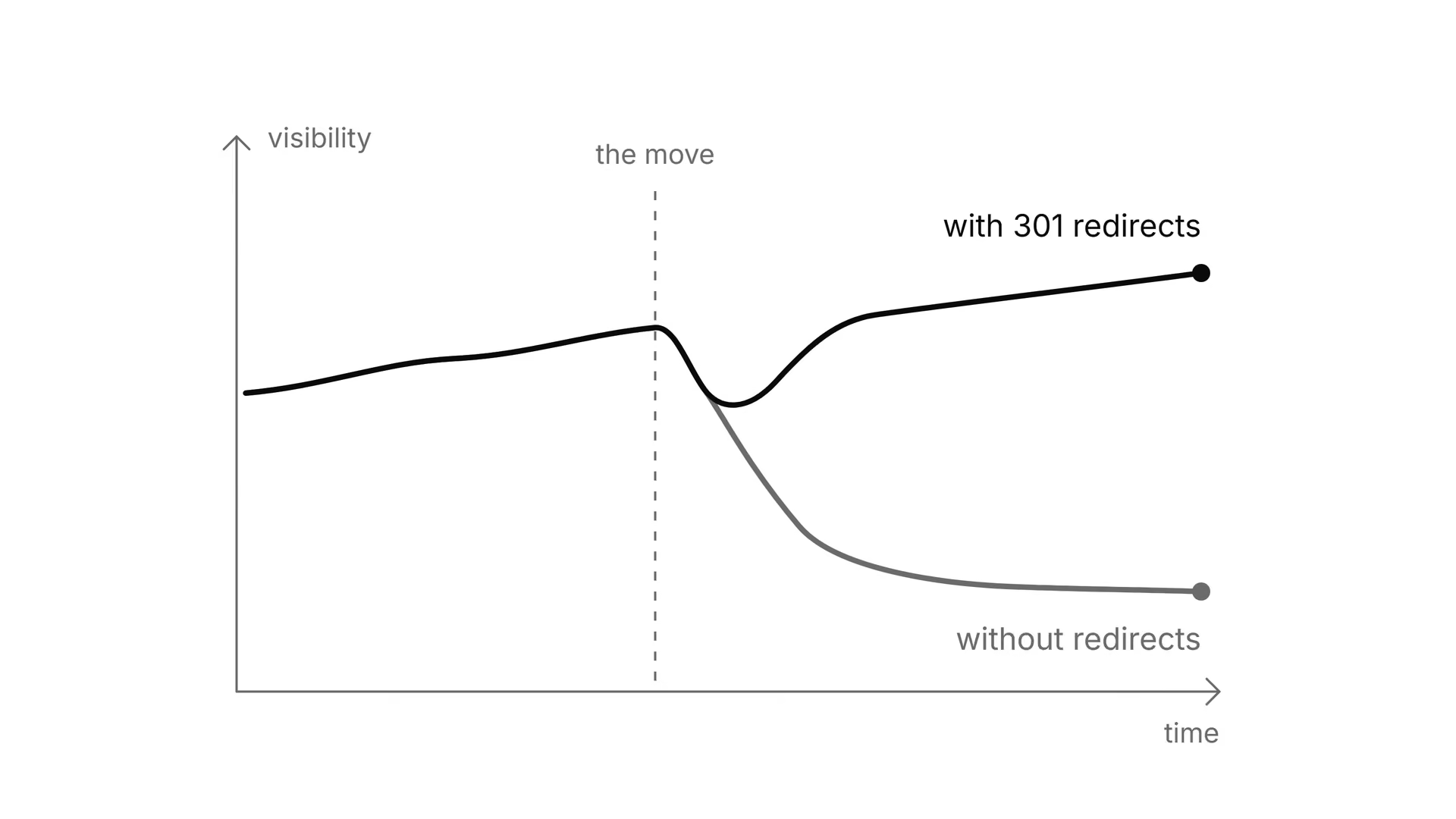
Not by itself. According to Google, a permanent redirect (301) does not cost a page its value; after a move, rankings can fluctuate for a few weeks, and that is about it. What loses ground is usually not the move itself but three mistakes: not redirecting the old addresses to their new ones one by one, a noindex or robots.txt block left over from the staging site, and redesigning the look, the content and the page structure at the same time as the move.
Why do addresses change when you switch platforms?
Every platform builds product addresses in its own layout. On ikas, products, categories and brands attach directly to the root of the domain, as in yoursite.com/product-name. On Shopify, products sit under /products/ and you can change only the last part of the address. Shopify's own migration page also says that the link structure will differ from your old service and that old links may not open. So when you move from one platform to another, most of the addresses Google knows can change overnight.
With custom software you set the address structure yourself. The safest path is to keep the old structure as exactly as you can: if an address does not change, there is nothing to redirect. For the addresses that do have to change, there is one tool: the permanent redirect.
What is a 301 redirect, and how is it different from a 302?
A 301 tells browsers and Google "this page has permanently moved to this address". According to Google's documentation, with a permanent redirect (301 or 308) the new address is shown in search results, and the redirect counts as a strong signal that the new address is the canonical, or main, one. With a temporary redirect (302 or 307), the old address stays in the results. A move needs the first kind.
How do you prepare the redirect list?
This is where the real labour is. Google recommends that, before the move, you prepare a list that matches every address of the old site to its new one; products, categories, brands, blog posts, and even images and videos belong on it. If you are leaving ikas, the list comes from combining three exports, because products, categories and brands sit on the same root path. Once the list is ready, each old address is redirected straight to its final address. Google's crawler follows up to ten redirects in a row, but Google still recommends that you do not build chains, meaning you send the old address directly to the final address and not to an intermediate one. We handle the mapping list, the redirects and the monitoring after the move with you as part of SEO and Google visibility work.
Do not be afraid of the number of redirects; in Google's own words, even millions of redirects are not a problem. The problem is gathering them all in one place. Redirecting hundreds of addresses that have no counterpart on the new site to the home page looks easy, but Google may treat that as a "soft 404". The old address of a product that has really been removed should return 404 or 410, and everything that has a counterpart should go to that counterpart.
What should you check on migration day?
At the top of Google's list of common mistakes is a noindex tag or a robots.txt block put on the staging site and forgotten at launch. Look at that first on migration day. Then check that each new page names itself as its canonical address, that if there are several languages the hreflang tags (which point search engines to each language version) point to the new addresses, and that the site's own internal links go straight to the new addresses and not through the redirect. The file or tag that verifies Search Console should be on the new site too; otherwise you lose your reports on migration day.
Submit the new sitemap to Search Console. Google also recommends submitting the lists of old and new addresses as separate sitemaps to monitor the move: as the number of indexed addresses in the old sitemap falls, the new one's should rise. In the days after the move, Google crawls the site more than usual because of the redirects; your server needs to be ready for that.
How much do rankings fluctuate after a move?
Google gives no exact duration. According to its migration guide, the fluctuation can last a few weeks or longer on a medium-sized site, and longer on large ones. Old addresses may keep showing in results for a while; they disappear on their own in time. Do not rush to remove the redirects; Google's guidance is explicit: "Keep the redirects for as long as possible, generally at least 1 year."
The Change of Address tool in Search Console is needed only when the domain name changes. If your domain stays the same and only the platform and the addresses change, you do not need this tool.
Should I redesign the site while I move?
Google's answer is clear: change one thing at a time. If you change the platform, the domain name, the design and the content on the same day, Google says on its change of address page that you may see a loss of traffic, and when something goes wrong you cannot tell what caused it. So the calmest path is to move the platform first and keep the pages, titles and content as close to the same as you can, then improve the design and the content step by step. What you can do afterwards to look better on Google is covered in our note on how products stand out on Google.
Updated: