Why does the same order reach your ERP twice?
Payment and order notifications sometimes arrive twice; if the receiving side misses the repeat, the ERP records the order twice. Why, and how to prevent it?


Because the notifications (webhooks) between your site, the payment provider, the shop platform and the ERP are designed to repeat, so that they do not get lost. If the sending side does not get a reply in time, it sends the same notification again; if the receiving side does not recognise it as a repeat, it writes the order a second time. The fix is not to stop the repeats but to recognise them: look at the order's unchanging number and ask "have I written this before?" Without that check, a double record will happen one day, because the repeat is not a bug in the system but a feature put there on purpose.
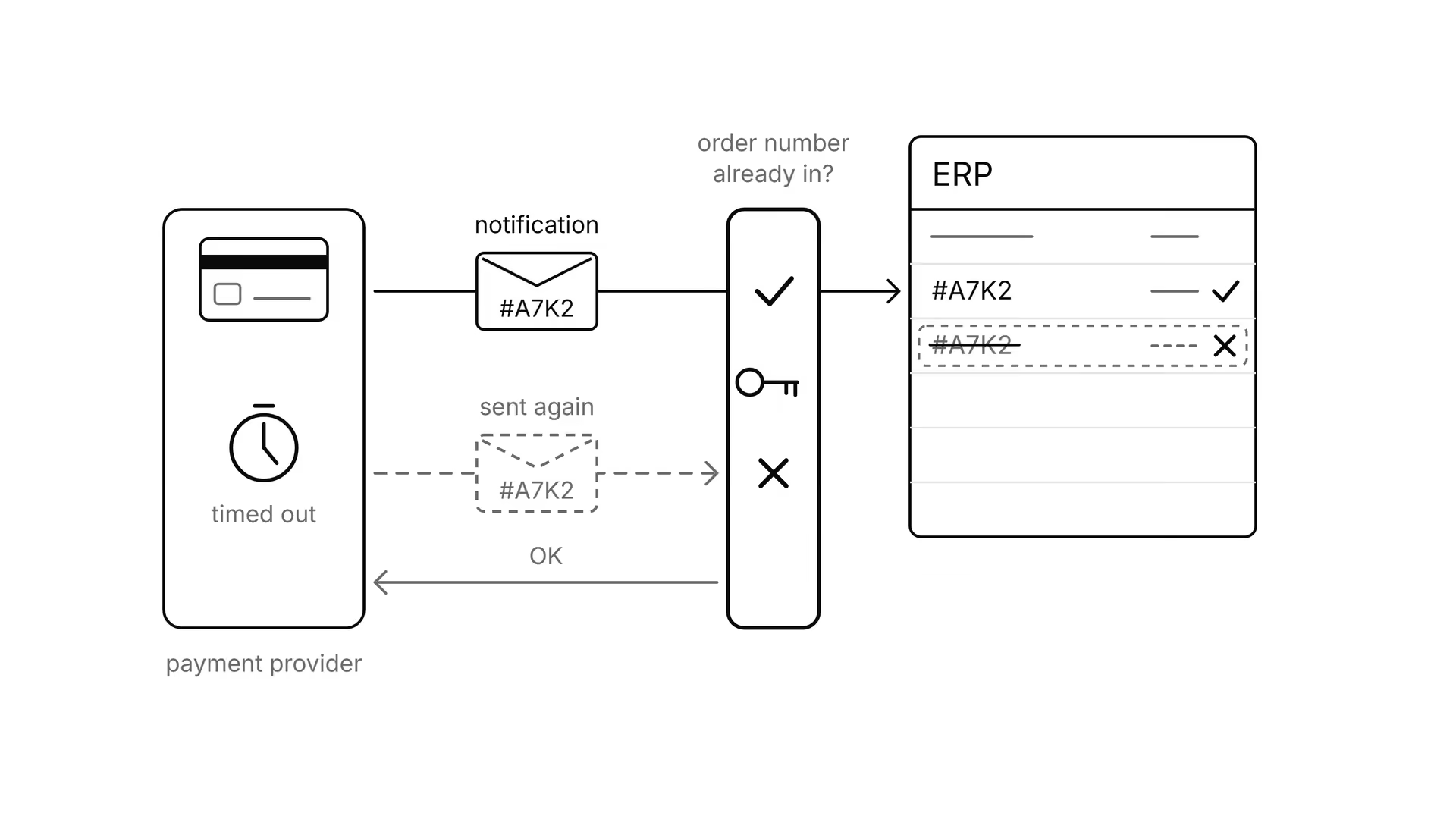
Why does a notification arrive twice?
When a payment is completed, the payment provider sends a notification to your site and waits for your site to say it was received. According to PayTR's documentation, if your site does not answer "OK", the notification counts as failed, and more than one notification can arrive for the same payment; network traffic or a momentary load spike are among the causes it lists. The documentation also says what to do: only the first notification should be processed, and the later ones should only be answered with "OK". It adds how to spot the repeats: detection of repeated notifications must be based on the merchant order number (merchant_oid).
The others follow the same path. iyzico resends a notification every 15 minutes until it gets a successful response. Shopify writes that, because of a network timeout or a retry, the same notification can arrive more than once; if no reply comes, it retries eight times within four hours. Stripe also says a webhook endpoint may occasionally receive the same event more than once. In short, any integration that trusts a notification to arrive once will sooner or later see the same order twice.
What does the most common scenario look like?
A notification arrives, and your site starts writing the order to the ERP. The ERP is slow at that moment, and the sender's waiting time runs out before the write is finished. On Shopify that time is five seconds in total. The sender assumes the notification did not get through and sends it again. But the first order has already been written. The second notification takes the same road, and the ERP gets a second record of the same order.
On WooCommerce the cause is a little different. WooCommerce's own webhooks fire when an order is created and again every time it is updated. A connection that writes to the ERP on the "order updated" event can write the same order again at every status change. There is the opposite problem too: WooCommerce disables a webhook it has failed to deliver more than five times in a row. If the ERP is unreachable for a few hours, orders may then not arrive at all, rather than arriving twice.
How do you prevent double records?
Every notification carries a number that does not change, and you recognise the repeat by it. With PayTR that is the merchant order number (merchant_oid). On Shopify, each delivery's own ID arrives in the X-Shopify-Webhook-Id header, and Shopify recommends using it to filter out repeats. On WooCommerce the delivery ID is regenerated every time, so it is no use; there you have to look at the order's own number and the type of event. The rule is the same everywhere: before writing the order, check whether a record with this number has already been opened; if it has, do not write it a second time, but still tell the sender "received".
Build the same protection into the ERP itself, because the check on the site can be skipped one day too. In Odoo, the field where you keep the customer's order reference is not unique by itself. Newer Odoo versions show a warning on screen when a second draft order is opened with the same customer and the same reference, but that warning is not a barrier and does not stop an order coming in through the API. You have to add the rule that keeps the external order number unique yourself, using a uniqueness constraint that Odoo allows. That way, if the same number arrives a second time, the database rejects the record. We set up these checks on both the site and the ERP at the start of ERP integration work.
How do you cut down on repeats?
What causes most repeats is the write to the ERP holding up the reply to the notification. Stripe makes a clear recommendation here: return a successful response before you start heavy work. Its example is replying before marking an invoice as paid in an accounting system. In practice, when the notification arrives the order is put in a queue, the sender is told "received" at once, and the write to the ERP is done calmly from the queue. Because the sender's wait no longer runs out, the number of repeats falls; and if the ERP is slow or down at that moment, the order waits in the queue instead of being lost.
It is also a good habit not to trust notifications completely. Besides notifications, Shopify recommends setting up a reconciliation job that now and then queries orders directly and fills in whatever is missing. If you set one up, it has to go through the same repeat check; otherwise an order arrives once by notification and once by reconciliation. On the shipping side, the carriers' documentation we checked offers no notification that tells your site when a parcel is scanned. There your site has to ask for the status itself, as we explain in our note on tracking numbers. We explained how a PayTR notification is set up in the WooCommerce and PayTR note, and when you need an ERP in the ERP note.