How should you back up an ERP database? Can you trust a backup you have never tested?
Taking a backup is half the job. One that has never been restored may fail when you need it. How to back up an ERP, where to keep it and how often to test it.


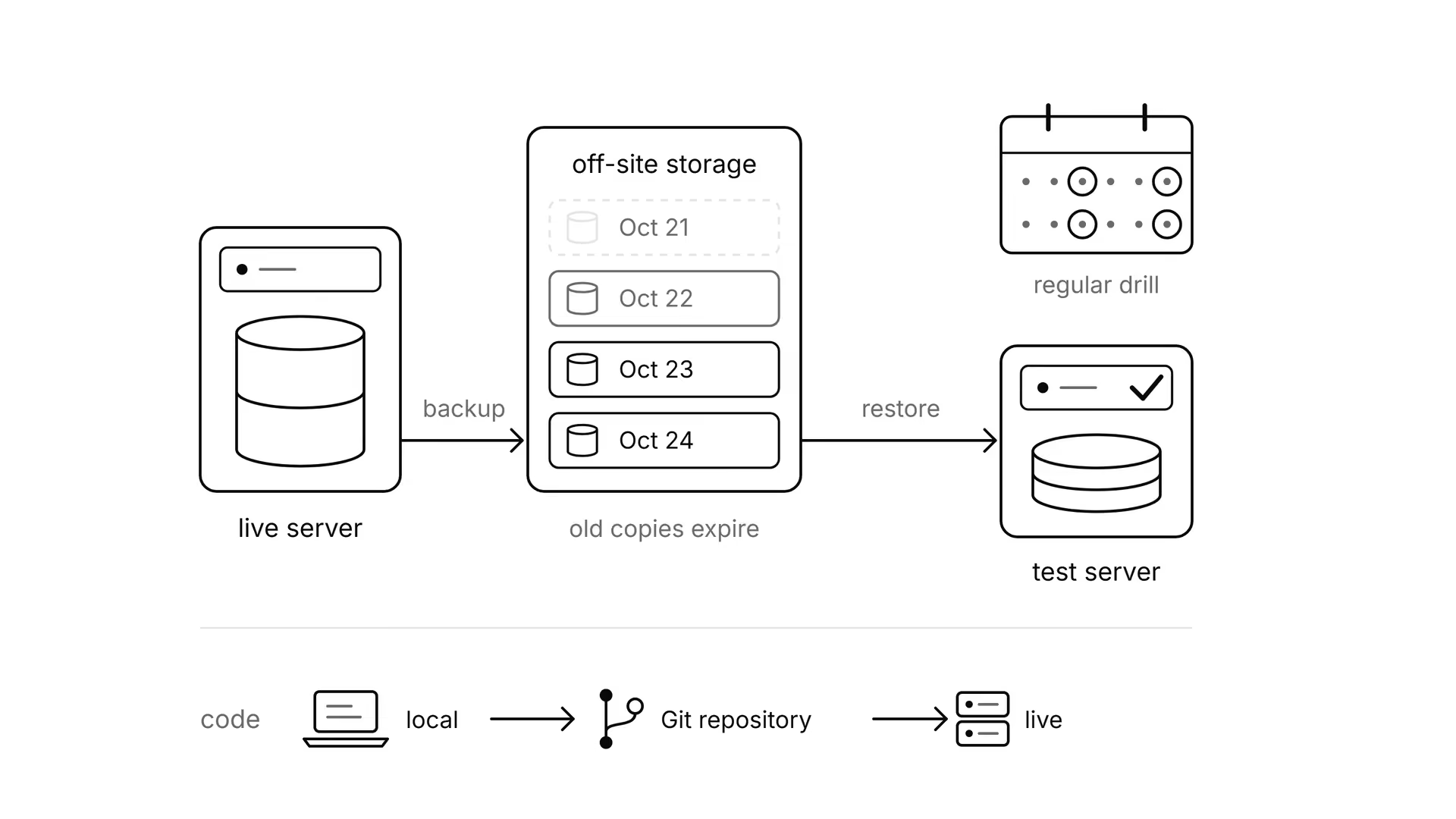
Take the backup, but the real job is to try restoring it. You cannot be sure that a backup which has never been restored and opened will work, and you usually find out on the worst day. So take the backup automatically every day, keep it off the server and encrypted, and once a month, or at the very latest every three or four months, restore it to a separate server and check that it really opens. Make that drill a task for one person or one team. A backup that is nobody's job turns, in time, into a backup nobody looks at.
What should an ERP backup cover?
An ERP is more than a database. Take Odoo as an example. Invoice PDFs, product images and files attached to records sit outside the database, in a folder called the "filestore". Odoo's deployment documentation wants the daily backup to cover the database and this folder together, and the backups to be copied to a remote archive that the server itself cannot reach. If you back up and restore only the database, the records come back but their attachments will not open.
How you take the backup matters too. The database manager on Odoo's screen can take and restore backups, but the same documentation recommends disabling that screen on a system open to the internet and notes that it can get stuck on large databases. For regular backups, the command line's odoo db dump or PostgreSQL's pg_dump tool, together with a copy of the filestore, is a sturdier route. According to PostgreSQL's documentation, pg_dump takes a consistent snapshot as of the moment it starts and does not stop users while it runs. If even a day of lost data is unacceptable, you need continuous archiving, which lets you return to any point in time. For a small or mid-sized business, a daily dump is often enough.
If you use Odoo on Odoo's own cloud, Odoo takes the backups. According to Odoo's service agreement, daily, weekly and monthly backups are kept for at least three months, and one copy sits in immutable cold storage. On Odoo.sh the production environment is backed up every day, but staging and development environments are not backed up automatically. Even so, downloading your own copy now and then means your data also sits in your hands.
Where should the backup be kept?
Code and data take separate routes. In an open-source ERP, your own modules and settings should live in a Git repository. They are tried locally first, then pushed to the repository, and the live server pulls the code from there. That way every change on the live system has a history, and if a server is lost the code is not. The database backup does not travel this route. GitHub's own documentation says plainly that Git is not designed for large database files and backups, and it does not accept files over 100 MB. On top of that, an ERP backup carries your customers' names, addresses and invoices. So it should live somewhere separate, encrypted, and reachable only by authorised people.
How many copies, on what media? There is a well-known rule: 3-2-1. Keep three copies of the data, on two different media, with one stored outside the business. Against ransomware, one copy also needs to be offline. The ransomware guide of CISA, the US cybersecurity agency, reminds readers that such malware finds and deletes the backups it can reach, and it recommends backups that are offline, encrypted and regularly tested.
How long should backups be kept?
Keeping every day's backup forever is both needless and expensive. The disk fills, backup time grows, the server slows down. Set up a cycle instead. Odoo.sh's own scheme is a good example: daily backups for the last seven days, weekly for the last four weeks and monthly for the last three months. Older ones are deleted.
There are two legal sides to know about here. Backups that contain personal data are not outside the scope of the regulation on deleting, destroying or anonymising personal data issued under KVKK, Turkey's personal data protection law. The authority's deletion guide requires every copy where a piece of data exists to be identified when it is destroyed. On the other hand, commercial records have to stay readable for a long time. The Turkish Commercial Code requires commercial books and documents to be kept for ten years, and requires records in electronic form to be capable of being made readable within a suitable time. The Tax Procedure Law also requires all the information and passwords needed to read electronic records to be handed over on request throughout the retention period. Encrypting the backup is right, but losing the password can be a legal problem as well. Do not keep the password in the same place as the backup, and do not lose it. Decide with your accountant and your lawyer how long each record is to be kept.
How do you run a restore drill?
Taking a backup and being able to restore it are not the same thing. Amazon's cloud architecture guidance lists two things among its bad examples: assuming the backup exists, and restoring it without ever looking at the data inside. So the drill is not just "the file was loaded". Load the backup onto a separate test server that cannot mix with live, open the ERP, look at a few invoices and attachments from the last few days, and check that stock and customer account balances agree. Note how long the restore took, too. That time tells you how many hours the business will be stopped if a server dies one morning.
Write down who will do this. If it is to be monthly, or every three or four months, put it in the calendar, have IT or the team that looks after the server do it, and record the result in a short note. If no one on your side looks after the server, we take on the backups and the drill as server backups work. If the drill turns up something missing, the filestore forgotten for example, you learn it on a drill day, not on a morning when the server is down.
We explained whether you really need an ERP in the ERP note and how it should talk to your site in the ERP architecture note.