How do you write product codes (SKUs)? Why do duplicate products appear, and how do you find them?
A SKU is your internal code, not the maker's part number or the barcode. How to build one, why you shouldn't rename old codes, and how to find duplicates.

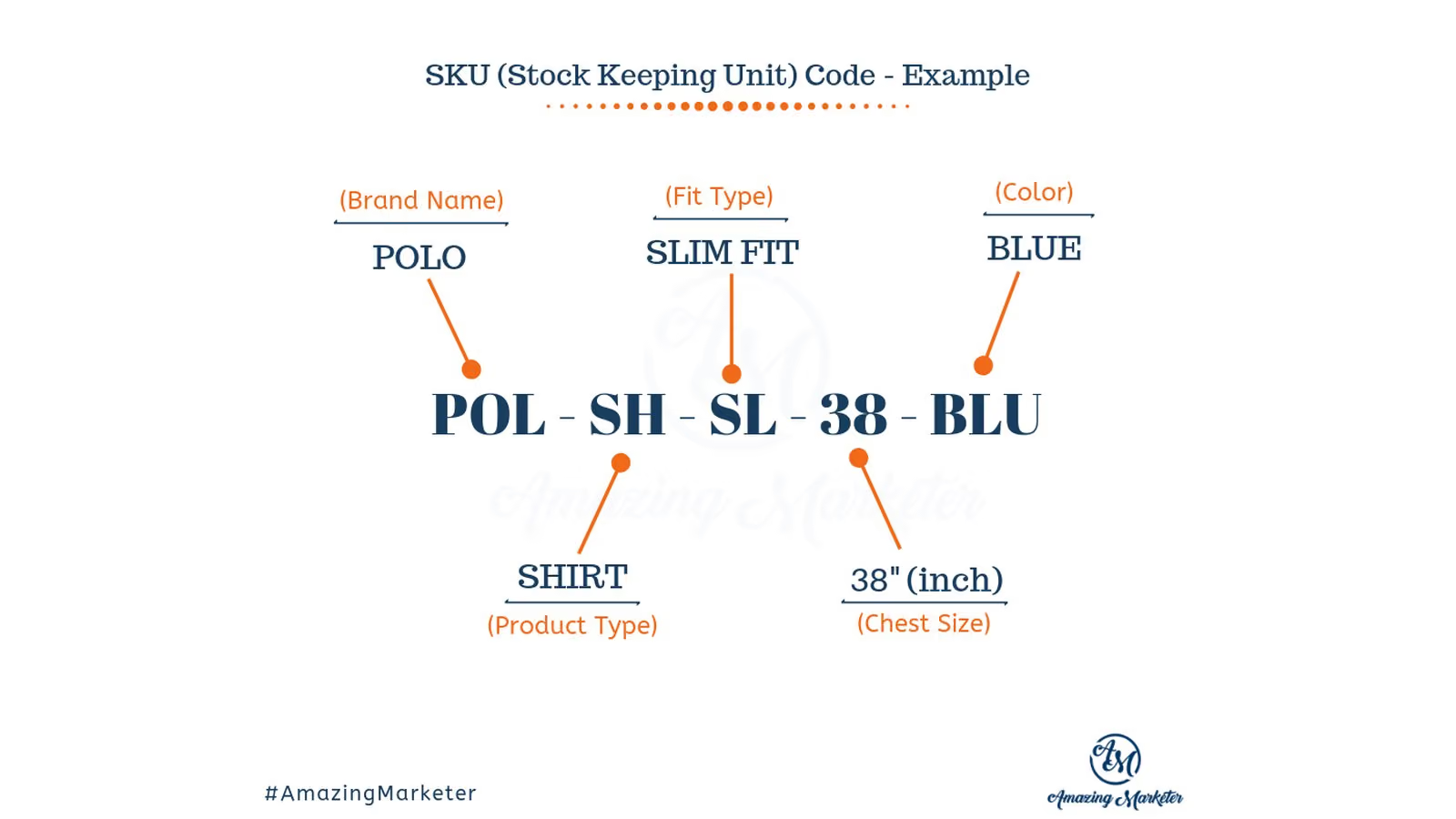
A SKU is your own internal code. It is not the manufacturer's part number and it is not the barcode. A good code is built from things about the product that never change, follows one spelling rule, and stays the same once it has been given. When the same product gets created twice, the cause is almost always spelling. "6202 2RS" and "6202-2RS" look like the same bearing to you. To your software they are two different products.
What's the difference between a SKU, an MPN and a barcode?
All three identify a product, but different people assign them and they do different jobs.
| Code | Who assigns it | What it's for |
|---|---|---|
| SKU | You | Your warehouse, orders, invoices and website find the product by it |
| MPN | The manufacturer | Tells the product apart from the same maker's other products |
| Barcode (GTIN) | The company that licensed a GS1 prefix | Tells the product apart from every product in the world, scanned at the till |
Barcodes come from the GS1 system. A national GS1 office gives each member company a company prefix, and the company builds a number for each product variant from it. In Turkey that office is GS1 Türkiye, and its prefixes start with 868 or 869. GS1 Türkiye explains that the manufacturer is encouraged to assign the barcode but doesn't have to. An importer can do it too. So a barcode starting with 869 doesn't prove the product was made in Turkey. You can look up who owns a barcode with GS1's Verified by GS1 service.
Google Merchant Center asks for all three in separate fields. As of November 2026, Google's own help pages say:
- id: your identifier for the product. Google recommends using your SKU here. 1-50 characters: letters, numbers, dashes and underscores.
- gtin: the barcode, 8, 12, 13 or 14 digits long. Each colour and size needs its own GTIN.
- mpn: the manufacturer's part number. It's required when the product has no manufacturer-assigned GTIN.
For both of the last two Google gives the same warning: if you're not sure, leave it out. Don't guess and don't make up a value. Unless you are the manufacturer, don't send your own code as the MPN.
How do you build a good product code?
Build the code from parts of the product that will never change. The sturdiest choice is a brand abbreviation plus the manufacturer's own code, like MRK-6202-2RSH. Here MRK stands for the brand and the rest is the code the manufacturer prints. Anyone who sees the product can read it, and the manufacturer won't change it.
Keep anything that can change out of the code. Price, warehouse, shelf, supplier, season and promotion are the usual suspects. Imagine you put the supplier's name in the code. If you buy the product from another company tomorrow, the code starts telling a lie, and you can't change it. That information belongs in its own fields on the product record.
Write the spelling rule down once and have everyone follow it:
- Always upper case.
- No spaces. Use only dashes as separators.
- No accented or local characters. Google also recommends plain ASCII for IDs. (In Turkey that means no ç, ğ, ı, ş and so on.)
- Never tell two products apart only by letter case. Google says it may treat
abc-1andABC-1as the same product. - Every colour and size gets its own SKU, as a suffix on the base code, like
MRK-1040-BLACK-L.
The rule can fit on one page. What matters is that everyone who creates a product looks at the same page. If you're building a new site, we write this rule together in the first week of ecommerce development.
Can I rename my existing codes in bulk?
Don't, at least not all at once and not on a whim. A code isn't just a label. A lot of things are tied to it:
- Order and invoice history. An issued e-invoice can't be edited afterwards. The old invoice keeps the old code.
- Website URLs. If the code is part of the product URL, changing the code changes the URL, and Google treats the page as a new one.
- Google Merchant Center. Google states plainly that changing the
idoverwrites the product and its history. It also asks you never to give an oldidto a different product. - Integrations. Your website, ERP, marketplaces and accounting software usually match products to each other by this code. Change it and the match breaks. In a Hepsiburada integration this order matters even more, because other sellers may be selling the same product.
If a change really is necessary, don't delete the old code. Give the product its new code and keep the old one on the record as an alias, so search and integrations still recognise it. If a URL changed, redirect the old URL to the new one permanently (301). We walk through that in our note on whether changing your ecommerce platform hurts SEO. Leave the id you send to Merchant Center at its old value. Apply the new rule to new products from now on.
Why does the same product get created twice?
We keep seeing the same causes:
- Different spelling. A space, a dash, a dot, lower case. "6202 2RS", "6202-2RS" and "6202.2rs" become three records.
- Copying codes from paperwork. Goods arrive and the code on the delivery note goes straight into a new record. The supplier's spelling becomes your rule. When a second supplier writes the same product differently, a second record appears.
- Two people at the same time. One person searches, finds nothing, and creates the product. Meanwhile someone else has created it but hasn't saved yet.
- Bulk imports from Excel. The codes in the file are loaded without being checked against what's already in the system. Products coming in from a supplier's XML feed carry the same risk. Matching them by barcode or supplier code is covered on our supplier XML integration page.
How do you find duplicate product records?
Export all your products to Excel and normalise the codes. The goal is to reduce every code to one form: upper case, no spaces, no punctuation. This formula does the job:
=UPPER(SUBSTITUTE(SUBSTITUTE(SUBSTITUTE(A2," ",""),"-",""),".",""))
"6202 2RS", "6202-2RS" and "6202.2rs" all become 62022RS. Next to it, add =COUNTIF(B:B,B2). Every row with a result above 1 is a duplicate candidate. If your codes contain local letters such as the Turkish ı, İ or ş, convert those to plain letters as well, because upper-casing them can give results you don't expect.
The second check is the barcode. If the same barcode appears on two records, those two are very likely the same product. Bundles you put together yourself can be an exception, since they use the main product's barcode.
This list only gives you candidates. Normalising can also match two different codes that happen to look alike. Have a person look at each pair before merging.
How do you merge two records?
- Pick the record that stays. Usually it's the older one, the one with orders, invoices, a website URL and Merchant Center history.
- Move the stock with a document. Transfer the other record's stock to the surviving one with a transfer or stock count slip. Don't just overwrite the number by hand, so there's a trail.
- Repoint the linked records. Open orders, price lists and supplier codes move to the surviving record.
- Archive, don't delete. Old invoices point to that record. Set it to inactive and add its code to the surviving record's aliases.
- Fix the website. If the duplicate is also live on the site, redirect its URL to the surviving product with a 301.
Then close the door. When a new record is created, the system can check the normalised code and the barcode and warn "this product may already exist". Asking for that while an ERP or ecommerce site is being built is far cheaper than cleaning up hundreds of records two years later.
If your product records are messy and your website and ERP disagree because of it, that cleanup is part of our ERP setup and integration work.