What happens to a static site on our own server as the content grows?
As a static site grows, visitors notice nothing; what grows is build time, images and disk space. When is static not enough, and what then?


Almost nothing, as far as visitors are concerned. On a static site every page is a file prepared in advance, and the server does the same job for a hundred pages as for a hundred thousand: it finds the file and sends it. What grows with the content happens behind the scenes: the time it takes to build the site, the work of processing images, the space the site takes on disk and the package sent to the server with every release. Set these up right from the start and they stay out of your way for years. A static setup only stops being enough on its own when the content starts changing by the minute.
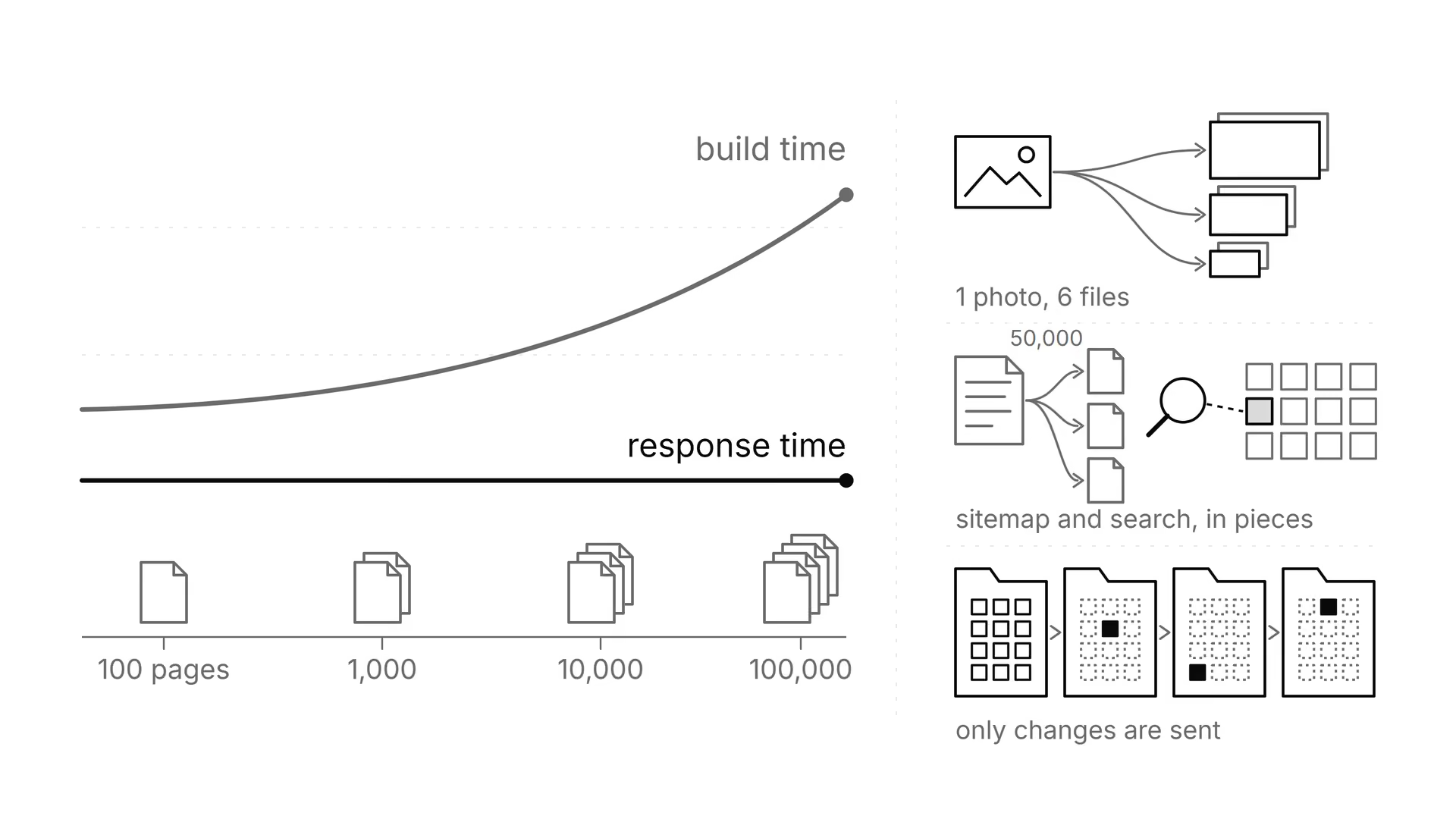
Will visitors notice the growth?
No, because the server's work does not grow with the number of pages. When a visitor asks for an address, the server does not query a database or rebuild the page; it sends the finished file from disk. A web server such as nginx needs a few tens of megabytes of memory for this and sends a page on its way within milliseconds. Ten times as many pages would not change that picture. Traffic spikes rarely hurt a static site either, because sending a finished file is the cheapest thing a server can do. That is why a static site is the easiest way to start hosting on a server of your own. For content-heavy sites such as a blog, a guide or a showcase site, we build this setup as part of Astro website work.
What grows behind the scenes?
The first thing to grow is build time. On a static site the build regenerates every page with every release, and that time grows roughly in step with the page count. A corporate site of a hundred pages builds in seconds; past a few thousand pages it takes minutes.
Images carry the real weight. The build turns every photo into several sizes and modern formats for phones, tablets and desktops; a single image often becomes five or six files. That takes close to a second per image. At that pace, reprocessing three thousand product photos on every release takes more than half an hour. So the build should process only new or changed images. In a well-built pipeline this step finishes in a few seconds when no image has changed.
The second item is disk space and upload. In every release of a site, most of the room goes to images and videos, not pages. Keeping a few earlier releases so you can roll back in one step is a good habit, but every release grows as images and videos pile up. Sending the whole site with every release also gets slower as the site grows; videos barely compress, so the package does not shrink. Once the site grows, the right move is a release method that sends only the files that changed and shares the unchanged ones between releases. Then keeping ten releases takes barely more room than one. We set up the server together with this release method as part of server setup and management.
The third is search and the sitemap. Google reads at most 50,000 addresses from a single sitemap file; a site past that splits its sitemap into parts. On a bilingual site, a separate sitemap per language makes this easier from the start. Site search need not load the server either: tools such as Pagefind split the search index into small pieces at build time, and the visitor's browser downloads only the pieces for the words being searched, not the whole index. What the number of pages does and does not change on Google's side is covered in our note on publishing many pages.
When is a static site not enough?
When the content changes often, not when it grows. If prices and stock change many times a day, rebuilding thousands of pages for every change fits neither the build time nor the number of releases. Anything that differs from person to person, such as customer-specific prices, a cart or a member login, cannot be a finished file by definition.
At that point the answer is not to give up the static setup but to combine the two. The page's frame and text stay finished files; small changing parts such as price and stock arrive live once the page opens. For larger catalogues, running Next.js ISR on your own server, which builds a page the first time a visitor opens it and keeps it, is also a good route; our note on the Vercel bill explains why that is cheap on a server of your own. If you are commissioning ecommerce development, making this split from the start costs far less than changing it later.
A static site does not get slower as it grows; its build just takes longer and it takes up more disk. With a setup that processes an image only when it changes, sends only the files that changed and keeps a limited number of old releases, that growth stays harmless for years. What decides it is not how much the content grows but how often it changes. For a corporate site, catalogue or blog updated a few times a week, a static site on your own server is the simplest and cheapest pair. If your prices change by the minute, set apart the part of the page that has to stay live from the start.