Our Vercel bill keeps growing. Should we move to our own server?
Page regeneration, not visitors, grows a Vercel bill. What to check before you move, and how to move to your own server safely.

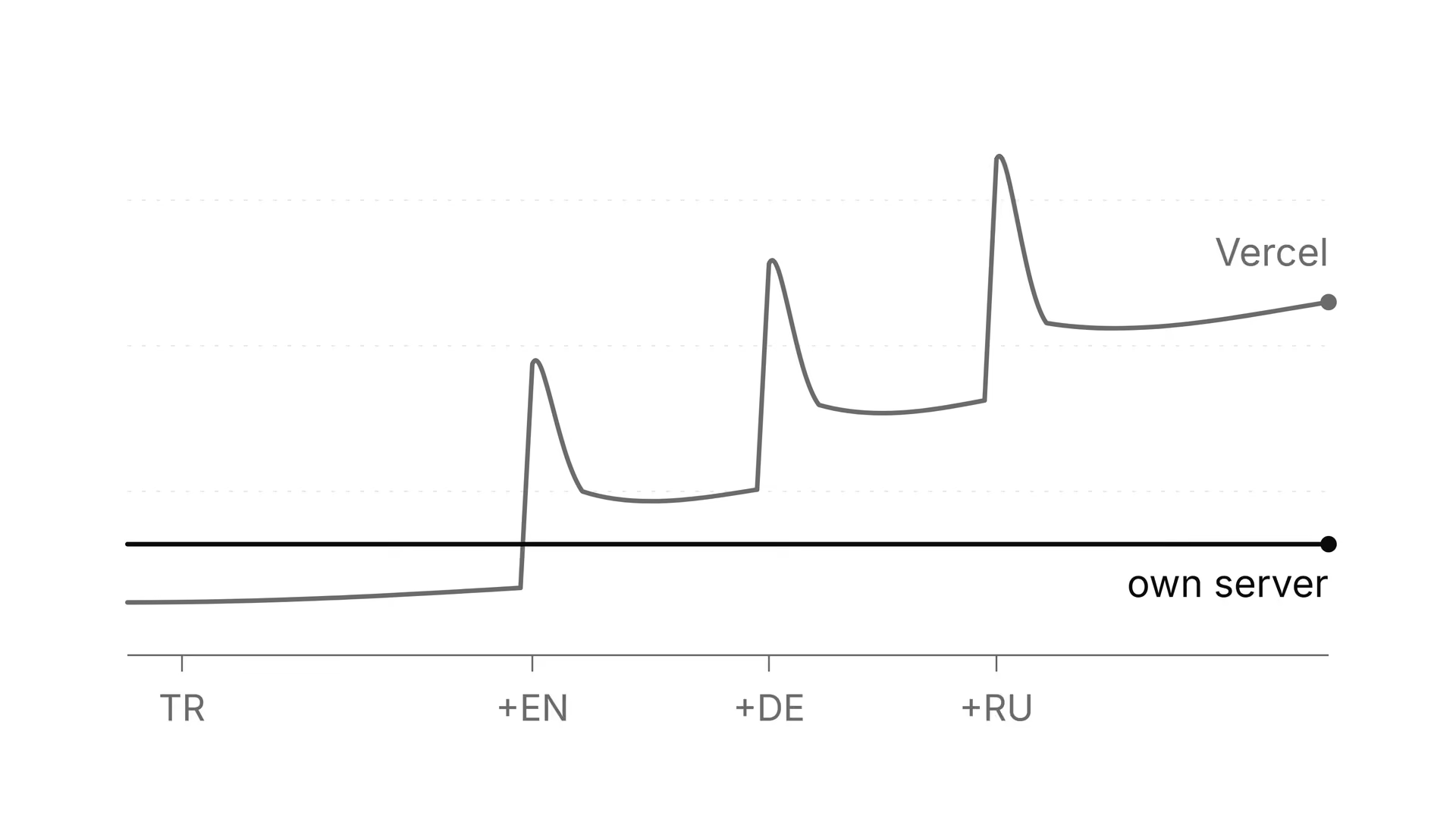
If your catalog is large and you publish in more than one language, most likely yes. But before you move, find out what is growing the bill. Vercel charges less for your visitors than for how often your site regenerates itself, and that line grows with every product and every language. A few settings bring the bill down right away. If you want a fixed, predictable cost, the lasting answer is a server of your own.
What makes a Vercel bill grow?
Open the bill line by line and you will see that the biggest amounts have little to do with visitors. In a store we looked into, ISR Writes came first. Each time Next.js regenerates a ready page, Vercel writes that copy to its own storage and counts every 8 KB separately. Build CPU Minutes came second: the minutes the machine that builds your site runs on every deploy. Fast Origin Transfer followed, the data travelling between the server and Vercel's network while pages are being generated.
Three things grow these lines together: the number of pages, the number of languages and how often bots crawl the site. In that store, which publishes a large catalogue in several languages, the day we opened the new languages alone made the bill jump unexpectedly. Most of that load came from search engines crawling the new pages and from the deploys we ran back to back that day. Every new language adds both a one-off spike and a lasting load to the bill.
The surprising part is how much of the bill comes from settings nobody notices. The product pages were set to refresh every thirty minutes, but one data request inside the page carried a 60-second lifetime. Next.js follows the shortest time on a page, so it was in effect regenerating the page every minute, and every visit from Google added a new write to the bill. Yet whenever a price changed, the system already refreshed the page at once; those 60 seconds did nothing useful. On another site, the "similar products" list on product pages hung on the daily price update. When prices changed once a day, every product page in every language went stale, and Vercel rewrote every one of them as the bots came by.
What should you check before moving?
So before you decide to move, look at four things. Is a forgotten short refresh time still sitting in your pages? Does a single change make thousands of pages stale at once? Are SEO and AI crawlers that do nothing for you wandering through your site at your expense? Does every small fix turn into a deploy of its own? Once you tie regeneration to events instead of time, refreshing only the product that changed, most of this line disappears on its own. A spend alert on Vercel is a good idea too. We would not set a hard spend limit, though: the moment it is reached, Vercel pauses your site.
What changes on your own server?
If that is not enough, a server of your own is closer than you think. According to Next.js's own documentation, a site running with next start on a single server supports ISR and image optimization without any extra setup. The work Vercel charges for comes down to writing a file to disk. Your monthly cost stays fixed, and opening a new language brings no surprise at the end of the month. Move your commerce backend and database to the same server, and the round trip to a server abroad on every page render goes away, while the backups land in your own hands. Pick a server in your own country and your customers' data stays there too, which simplifies your privacy notice; for us in Turkey, it takes the cross-border transfer clause out of the KVKK notice.
In return, you take on the work Vercel used to do for you. One server is one point of failure: you need monitoring, backups kept off the server, and a restore you have tried at least once. Memory matters as well. A Next.js build alone needs 2–4 GB; if two storefronts, the commerce backend and PostgreSQL share the server, 8 GB is tight and 12 GB is comfortable. Some server plans come with a 100 Mbit line. Without a cache layer in front of your images and pages, a busy crawl day can clog that line for hours. We take on the monitoring, the backups and these settings as server setup and management work.
How do you move without losing orders?
Don't try to finish the move in one night, either. Move the storefronts first; if anything goes wrong, pointing the DNS record back is enough. Watch them for a week, then it is the turn of the database and the commerce backend. Rehearse first without touching the live site: load a recent database dump onto the new server, try orders and payments in test mode, and time the transfer. On the real night you put the site into a short maintenance mode, move the final dump and update your payment provider's notification address. Because you have already timed it, you lose no orders. Keep the old platform for a week or two before you delete anything. This is the order we follow when moving off Vercel to your own server for a client.
That is also why this site runs on our own server. For a static site, a fixed monthly server fee is both cheaper and more predictable than paying per build. Still, it is not the right answer for every project. For a small site with little traffic, Vercel remains the easiest way. The math changes as products, languages and traffic grow, and your bill tells you when that moment comes.
Updated: