How do I add an AI assistant to my website?
A ready-made chatbot or your own assistant? Where an AI assistant gets its information, whether it makes things up, what it costs and what Turkey's KVKK says.

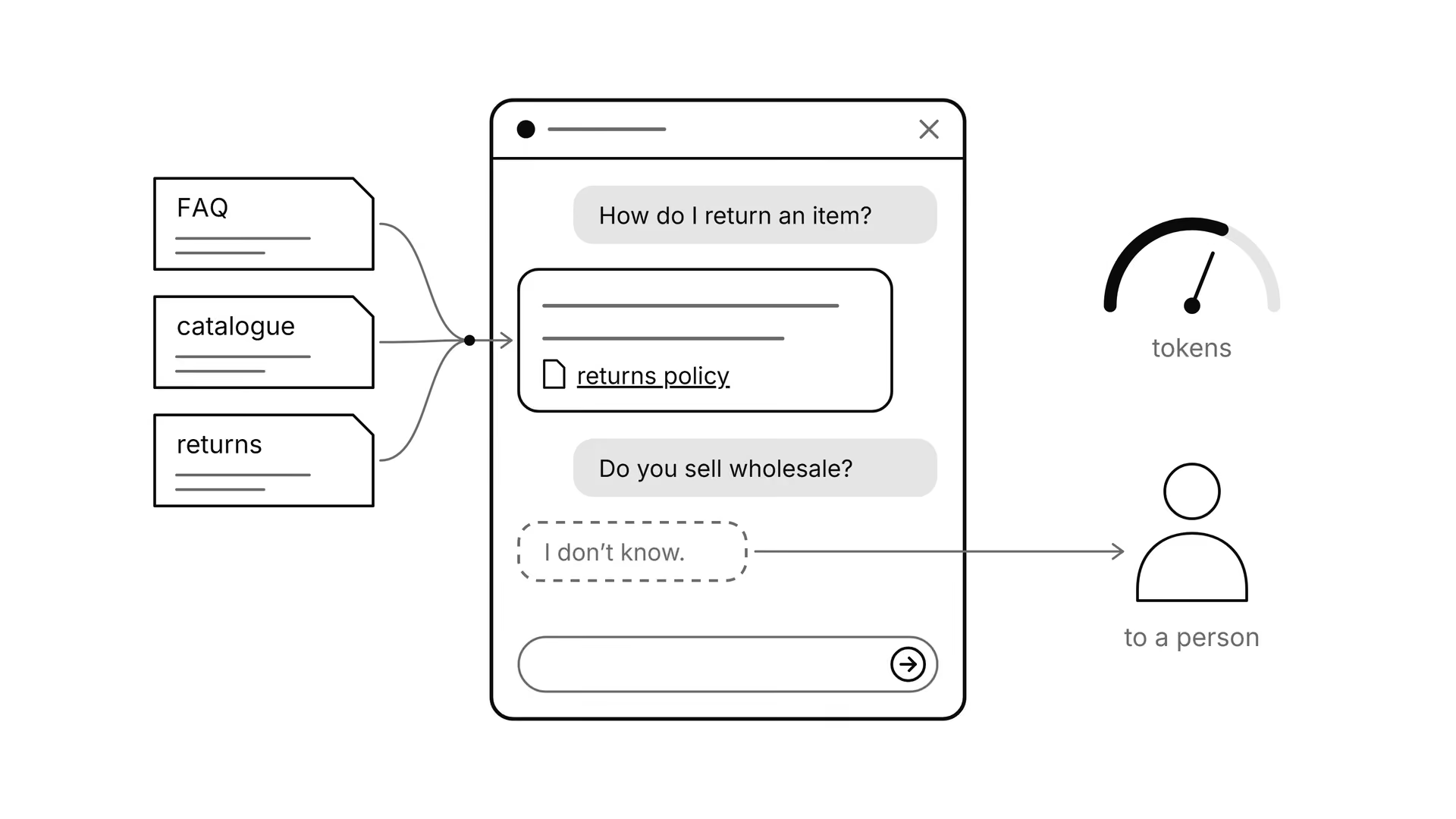
There are two routes: add the ready-made AI bot of a support tool such as Intercom, Zendesk or Tidio to your site, or build your own assistant on a language model's API. Whichever you choose, the real decision is the same: what information will the assistant answer from? An assistant that answers from your product catalogue, your FAQ and your shipping and returns terms is useful; one that can reach everything is risky. The cost works out differently too: with ready-made tools it is set by the conversations resolved, with your own assistant by the amount of text processed (tokens).
A ready-made chatbot or your own assistant?
Ready-made tools are the shortest route: a snippet of code goes on the site and the tool answers from the help content you give it. Pricing is mostly based on results. On 23 October 2026 the official pages showed Intercom's Fin charging $0.99 per resolved conversation; if it is used with Intercom's help desk, there is also a monthly minimum commitment. Zendesk charges $1.50 for each conversation its AI agent resolves on its own on the committed plan and $2 on the pay-as-you-go plan; the per-agent plan fee is separate. Tidio's Lyro starts at $32.50 a month, with 50 conversations. Paying per outcome means paying in proportion to how useful the bot is, but on a site that gets a lot of questions, the bill at the end of the month grows with the number of conversations.
With your own assistant you use a language model's API, such as Anthropic's Claude or OpenAI's models. This route takes more work: you build the knowledge base, the limits and the chat interface yourself. In return, what the assistant sees and says is entirely in your hands, and it can be connected, under control, to your site's own data, such as stock or shipping status. We take this route on as website AI assistant setup work.
Where does an AI assistant get its information?
A good assistant is not a model that knows everything; it is a system that finds the right document. This is called RAG (retrieval-augmented generation). In Anthropic's definition, when a question comes in, the relevant pieces are first found in a knowledge base and given to the model together with the question; the model writes its answer based on those pieces. OpenAI's file search tool does the same job: it splits the files you give it into pieces and makes them searchable by meaning.
As Anthropic also underlines, the quality of the answer depends on the quality of the knowledge base. An incomplete or outdated FAQ means confident but wrong answers. So the first job is to write down which sources the assistant will draw on: the product catalogue, the FAQ, the shipping and returns terms. Connecting the assistant to the whole back end of the site is both unnecessary and dangerous; we explain why in our note on what permissions to give an AI assistant.
Can an AI assistant make things up?
It can, and that has a cost. In Canada, an airline's chatbot told a passenger who had lost a relative that they could claim the discounted bereavement fare after the flight; the company's own policy did not allow this. The company argued that the bot was a separate entity responsible for its own actions. The tribunal that heard the dispute did not accept that argument and held, in Moffatt v. Air Canada, that the company was responsible for all the information on its website. What the assistant on your site says is what you say.
The ways to reduce making things up are known. Anthropic's guide suggests three: giving the model permission to say "I don't know", asking it to ground its answer in quotes from the documents you gave it, and telling it to use only the documents provided rather than its general knowledge. The same guide says these reduce errors but do not eliminate them entirely. So on matters that can count as a promise, such as price, right of return or a campaign, the safest approach is for the assistant to give its answer with a link to the relevant page, and to hand over to a person when it is not sure.
How much does an AI assistant cost?
The prices of ready-made tools are above: per conversation or per resolution. With your own assistant you pay for the amount of text the model processes, the tokens; prices are quoted per million tokens. On Anthropic's pricing page, Claude Sonnet 5.5 costs $2 per million input tokens and $10 for output; the smaller Claude Haiku 5.5 costs $0.10 and $0.50. OpenAI's prices have the same structure.
A subtle point decides the cost: the model does not remember the previous question. With every question, the pieces found in the knowledge base and the conversation history are sent to it again, and paid for again each time. Let's run a calculation on our own assumptions: say 20,000 tokens of document pieces and history go with every question, and a 1,000-token answer comes back. On Sonnet 5.5 one answer costs about 5 cents. When the same document pieces are read from the cache, and cached input costs one-twentieth of the normal price, that drops to about 1 cent. On the smaller Haiku 5.5 the same answer comes to around a quarter of a cent even without the cache. Keeping the knowledge base tidy therefore both improves the answers and shrinks the bill.
Does customer data leave the country?
Most AI services run abroad. If the name, phone number or order details of a customer writing to your assistant go there, that can count as a transfer abroad. The KVKK, Turkey's personal data protection law, comes into play here: its guide to transfers abroad expressly treats a business in Turkey passing personal data to a data processor abroad as a transfer. Since the 2024 amendment the order is this: first, whether the data protection Board has issued an adequacy decision; if not, an appropriate safeguard such as a standard contract; and if there is none of those, only one-off, non-recurring incidental transfers. Once a standard contract is signed, it is notified to the data protection Authority within five working days. Explicit consent now sits only on this last rung, and relying on it for an assistant that runs every day looks risky to us. Talk this through with a lawyer. The best thing you can do on the technical side is never to send the assistant personal data it does not need.
Where should I start?
Start small. Feed the assistant the product catalogue, the FAQ and the shipping and returns pages first, run it read-only, and read the questions that come in during the first weeks. The questions it cannot answer also show what is missing from your site; they become new FAQ items, even new articles. If you want to set up an assistant, or review an existing one together with its limits, we do that with you. If your customers mostly write to you on WhatsApp, the assistant can work there too. The line is opened through Meta's WhatsApp Business API. What the assistant should be able to reach there is covered on our WhatsApp AI assistant page.